Restaurant Website Design: 6 Things Your Customers Want (New Data)
What do guests want from your restaurant's website? We surveyed guests to find the answer—here are the 6 biggest takeaways.
- 66% of people find new restaurants using Google, so make sure your restaurant shows up and allows ordering right from your website.
- 91% of guests check a restaurant’s website before ordering, so it's important to have a clear message, great food photos, and easy ordering.
- 75% of guests want to see a menu and order online. If the website is hard to use, they may not come back.
What do guests want from your restaurant website?
I’ve talked to hundreds of restaurant owners about this very question. Most have a few educated guesses. But none of them ever had a good, data-driven answer. That’s because there wasn’t good data available.
Now, there is.
We surveyed 1,300 restaurant guests in the US about how they use restaurant websites. What features or information do they look for? What things do they love to see? And just as important, what issues make them click the “Back” button?
6 Things to Include in your Restaurant Website Design
Owner’s survey data reveals some surprising answers to these questions—and more. And today, I’m excited to share the top 6 takeaways from the data about what you should include in your restaurant's website design.
Let’s take a look. 👇
Takeaway #1: Google search is the #1 way guests discover restaurants

📊 What the data says:
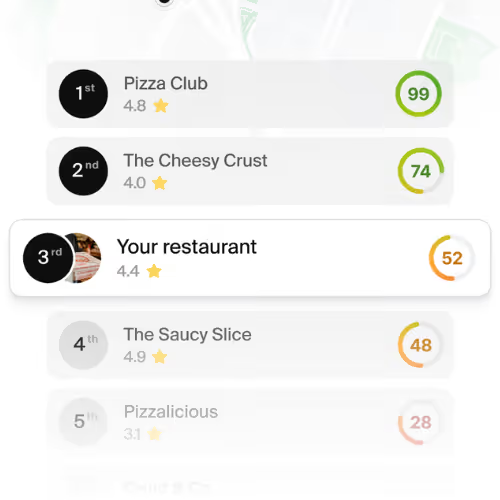
- Guests default to Google. 66% of guests prefer to find new restaurants via Google search. That’s why restaurant SEO matters.

Most owners underestimate how many guests prefer Google when looking for new restaurants. This data is clear: when hungry for something new, most guests go to Google.
- Don’t send orders to an offsite online ordering system! Google likes it when searchers can complete their order on the same website they started on. When you send guests to another domain, Google assumes your website isn’t helpful. That means your site should have it's own online ordering.
- Local SEO also matters. Your Google Business Profile is what shows up in Google’s “Local Pack” on search and Google Maps. So add amazing photos of your menu items and write a detailed description of your restaurant. And always link your website so guests can place orders.
- Go after the most common keywords through your homepage and menu pages. The most popular keywords are things like “Best Italian in Lakeside” (homepage) and “Best birria tacos in Miramar” (menu pages). Your homepage should focus on your overall cusine, while menu pages go after specific entrées.
All of the above is a lot easier when you use a platform like Owner.com with built-in SEO. That way, you won't have to be a marketing expert to get customers from SEO.
📚 Learn more: The Best Restaurant Website Builders (Read This First)
Takeaway #2: 91% of guests visit your restaurant’s website before ordering takeout or delivery

📊 What the data says:
- Your restaurant website is your first impression. 91% of guests prefer to visit a restaurant’s website before deciding to order takeout or delivery. That’s an overwhelming majority.
For the vast majority of guests, your restaurant website is your first (and maybe only) chance to make a good impression. We have a few seconds to make this impression. That’s why I always encourage restaurant owners to nail these two things on their homepage:
- Clear headline up front. Guests make split decisions on the homepage. So let’s place a headline at the top that helps guests quickly understand what we specialize in. For example, “Our family's handmade recipes brought from Sicily, Italy to Lakeside, California.”
- Highlight popular dishes. People eat with their eyes. So catch their attention by pairing appetizing words with mouth-watering visuals. I like an overhead shot of popular dishes or even a single shot of our “signature” item.
I see restaurant website conversion rates consistently go from 2%–3% to over 15% by making this change. Even if you don’t offer online ordering, I still recommend following this advice. And that’s because...
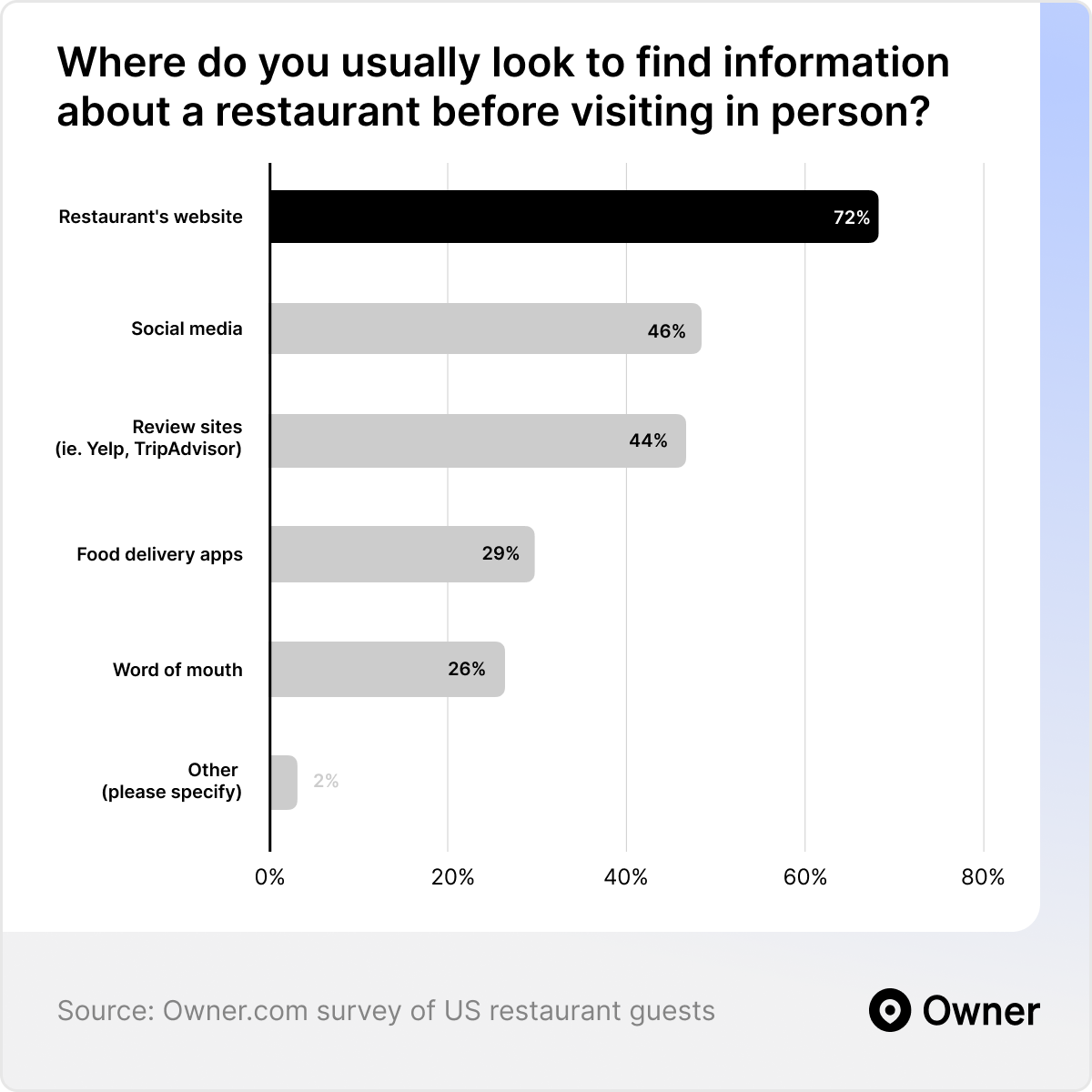
🔍 Zoom in: 72% of guests visit a restaurant’s website before dining in person
📊 What the data says:
- Guests check websites before dining in. 72% of guests also prefer to visit a restaurant’s website before dining in person. Even dine-in customers check your website first.
“That’s OK, we mostly serve dine-in customers.” Not so fast! Dine-in guests also check your restaurant’s website before visiting in person.
Guests really like third-party review sites. They see them as less biased. However, your restaurant’s website is the best place for guests to get important information. And they’re certainly willing to see how you describe your own cuisine and experience.
It’s a mistake to assume guests will only check OpenTable or ask a friend about your restaurant. They will look for your website first—even with dining in.
Takeaway #3: Guests want to see a menu (with photos) and they expect to be able to order from that menu
📊 What the data says:
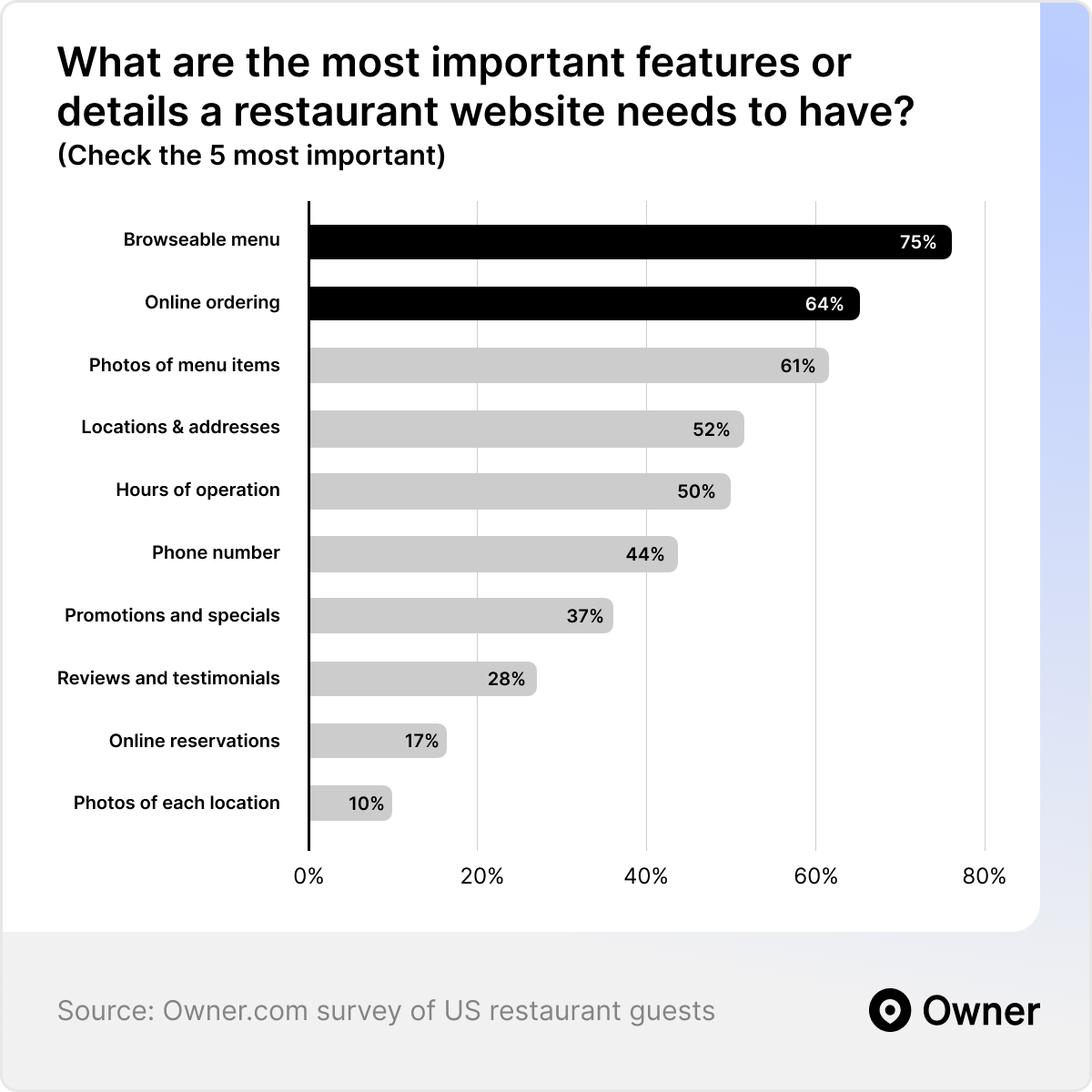
- Guests want to browse and buy. The majority of guests expect to see a browsable online menu (75% of guests) and the ability to order online (64% of guests). Guests say these are the two most important features a restaurant website needs to have.
- Your online menu must have pictures. 61% of guests say photos of your menu items are one of the most important features your website can have. Take the time to invest in great photography.
The best restaurant websites know most guests are trying to decide what to order. Or if they should order at all. Everything else is secondary.
It’s worth over-investing in your online menu and ordering experience for this reason. We’ve tested this extensively at Owner. Here are 3 things your menu and online ordering must have:
1. Fast checkout. Speed is critical when completing an order. By “fast checkout,” I mean options like Apple Pay. Many guests prefer these methods and will always choose them when available.
2. High-quality photos. We have our hero image on the homepage. Now, let's make sure every menu item also has attractive, detailed photos. This keeps guests engaged while they browse specific dishes.
3. Social proof. Guests often wonder, "What do others think of this place?" That’s why I always recommend showing reviews and star ratings under popular dishes. So guests know your food has impressed others.
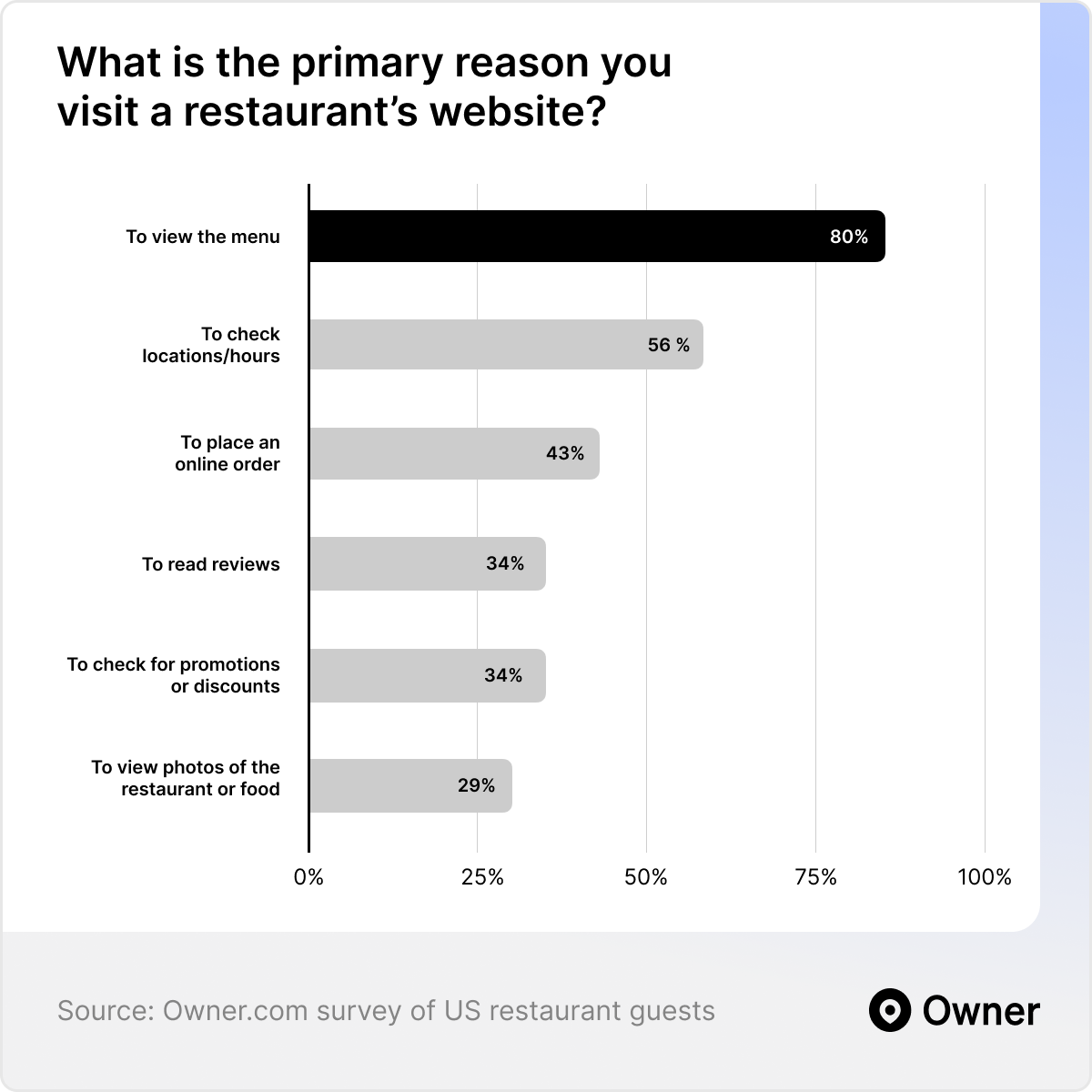
🔍 Zoom in: 80% of guests visit your website primarily to see your menu
📊 What the data says:
- Guests have menus on their mind. 80% of guests visit your website primarily to see your menu – it’s far and away the most common reason guests go to your website.
I found a local burger place on Google last week while looking for lunch. “Off to a great start!” I thought. And when I got to their website, things looked good! They had a clean layout, great photos of the location, and compelling reasons to try their food.
Then I opened the menu. “Oh jeez,” was my reaction. A text PDF with no pictures. It was extremely hard to browse on my phone. And I had no idea what any of these incredible-sounding dishes looked like.
It’s a single story, but it represents the experience of lots of guests. And as we can see above, it’s also a BIG problem. Guests look for lots of little details on your restaurant website. But the one thing they almost always look for is the menu. That’s where we want to really impress them.
🔍 Zoom in: 84% of guests look at your menu’s photos before ordering online

📊 What the data says:
- Your menu photography matters a lot. 84% of guests specifically look for photos of menu items. And that’s before deciding whether or not to place an order with a restaurant.
If my experience wasn’t enough to convince you, the data above just might. The majority of guests look at your menu to look at the photos. Guests eat with their eyes—and your menu should reflect that.
The very best way to improve your online menu is to use amazing photography. And to use an online menu design that highlights your photos.
Guests are used to the layouts they see from major brands and delivery apps. You don’t need to reinvent the wheel here. You just need to treat your menu photography as the #1 most important part of your menu.
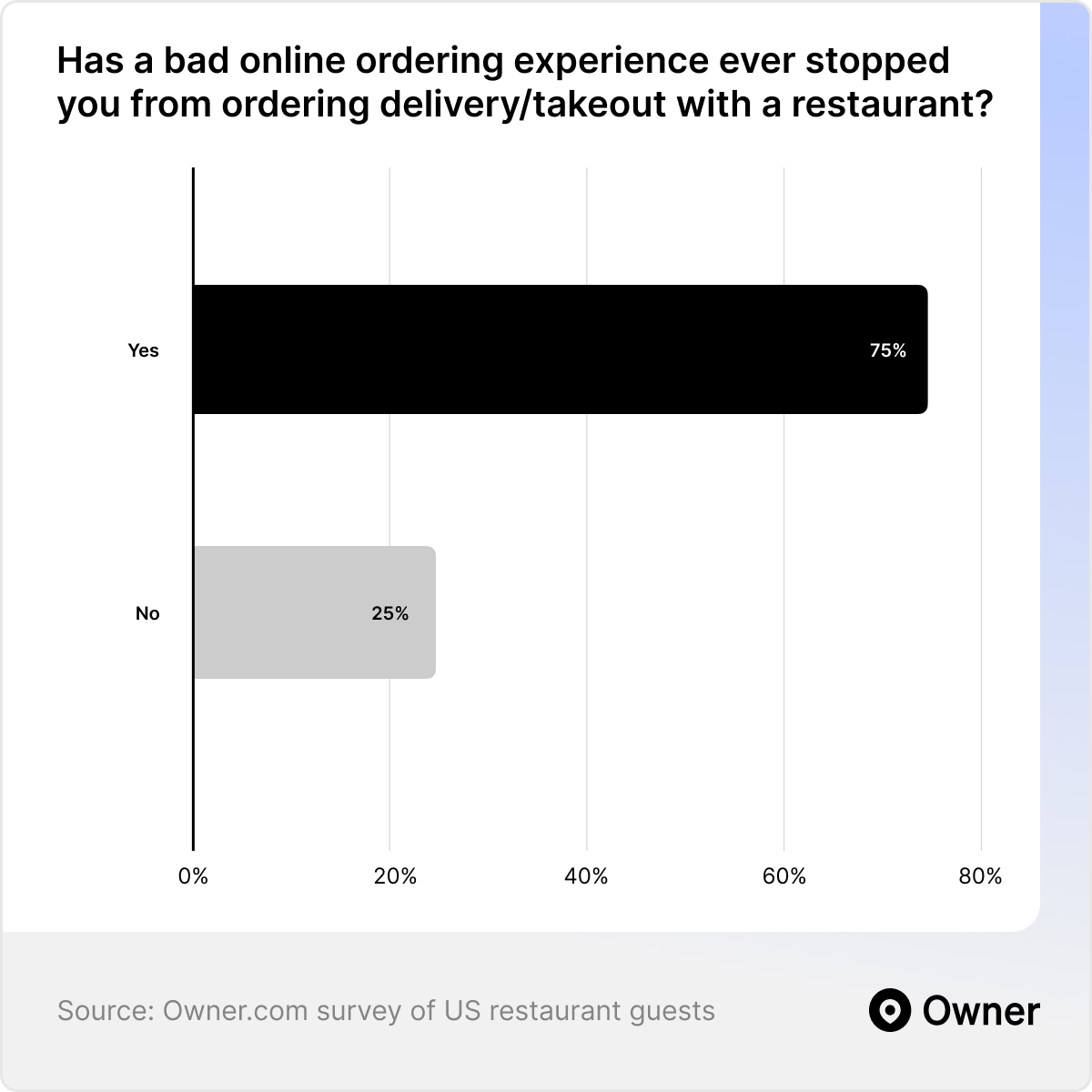
Finding #4: 75% of people won’t order from you if your website and online ordering experience are poor
📊 What the data says:
- Bad online ordering costs you sales. 75% of guests say a bad online ordering experience has stopped them from ordering. That’s a lot of potential customers lost.
- Confusing websites drive guests away. 69% of guests say a confusing or poorly designed website makes them less likely to place an order.
The data above really shows what’s at stake if you don’t have a great website, online menu, and online ordering experience. A bad online experience is like a leaky bucket that costs you sales.
Most first-time customers will choose another restaurant if they get frustrated. So when you invest in your website, spend more of your attention (and budget) on the 3 details that matter:
1. Website design. Make it easy to find key information. Use a website layout that shows off your brand but doesn’t overwhelm guests—use a design that’s familiar and clear.
2. Online menu. Add amazing photos and descriptions to your menu and make it browsable. Let guests order from any item page and list reviews and social proof right on your website.
3. Checkout. Let guests use fast checkout options like Apple Pay. When guests checkout manually, don’t make them fill in too many details just to place an order.
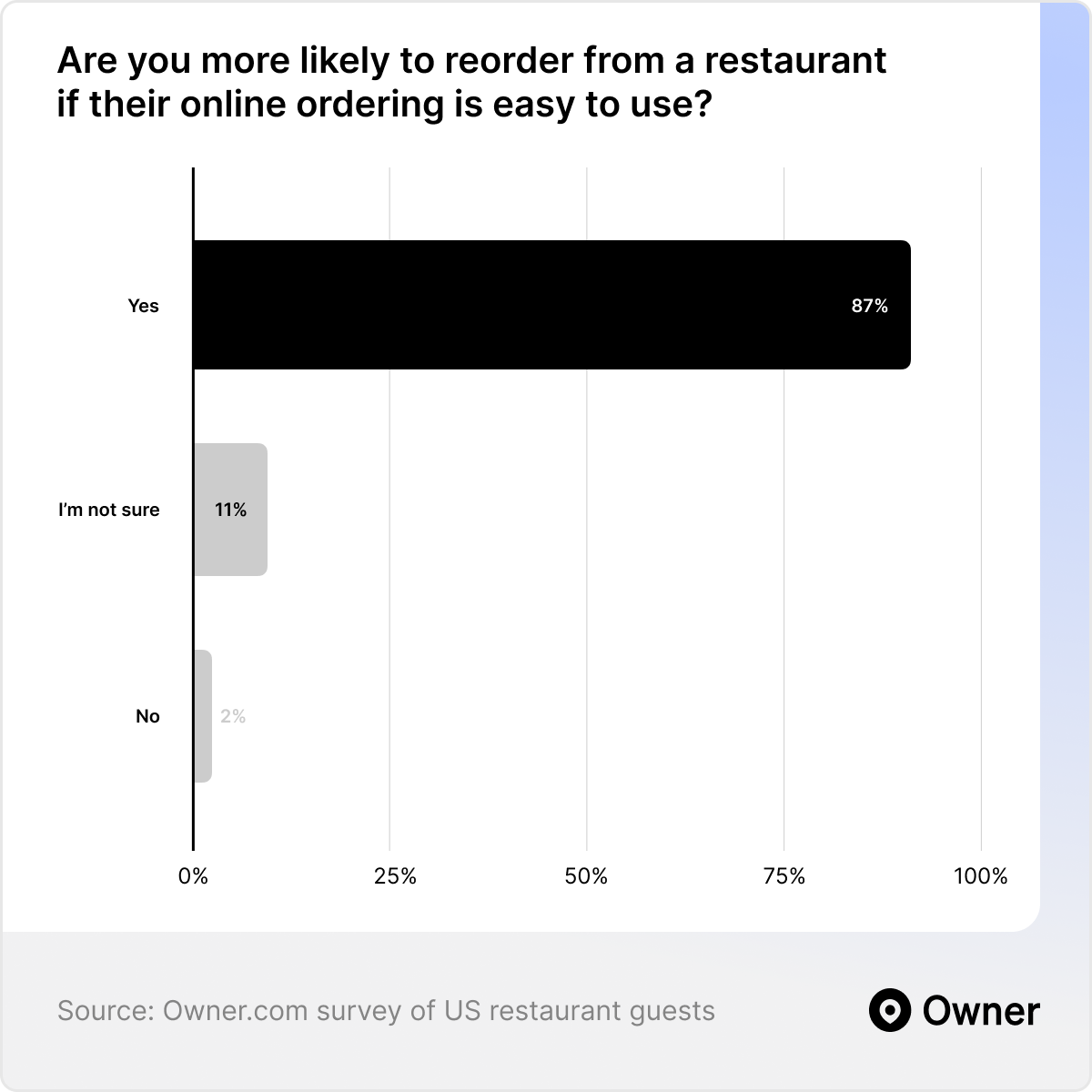
Takeaway #5: 87% of guests are more likely to reorder if you provide a great online experience.
📊 What the data says:
- Guests reorder from great websites. 87% of guests say they’re more likely to reorder from a restaurant with great online ordering.
Repeat customers value a great online experience even more than first-time customers. New customers might power through a frustrating experience. But they likely won’t come back after that.
So it’s clear a great online experience doesn’t just earn you more new orders. It also helps you turn one-time customers into regulars.
Restaurant retention is very important for casual and quick-service restaurants, too. Some of these restaurants see very little profit on the first order. It’s the second and third orders that really make their guests profitable. But if their online ordering is clunky or slow, it’s very unlikely they’ll get those guests back.
📚 Learn more: How Restaurant Mobile Apps Increase Reorders by 85%
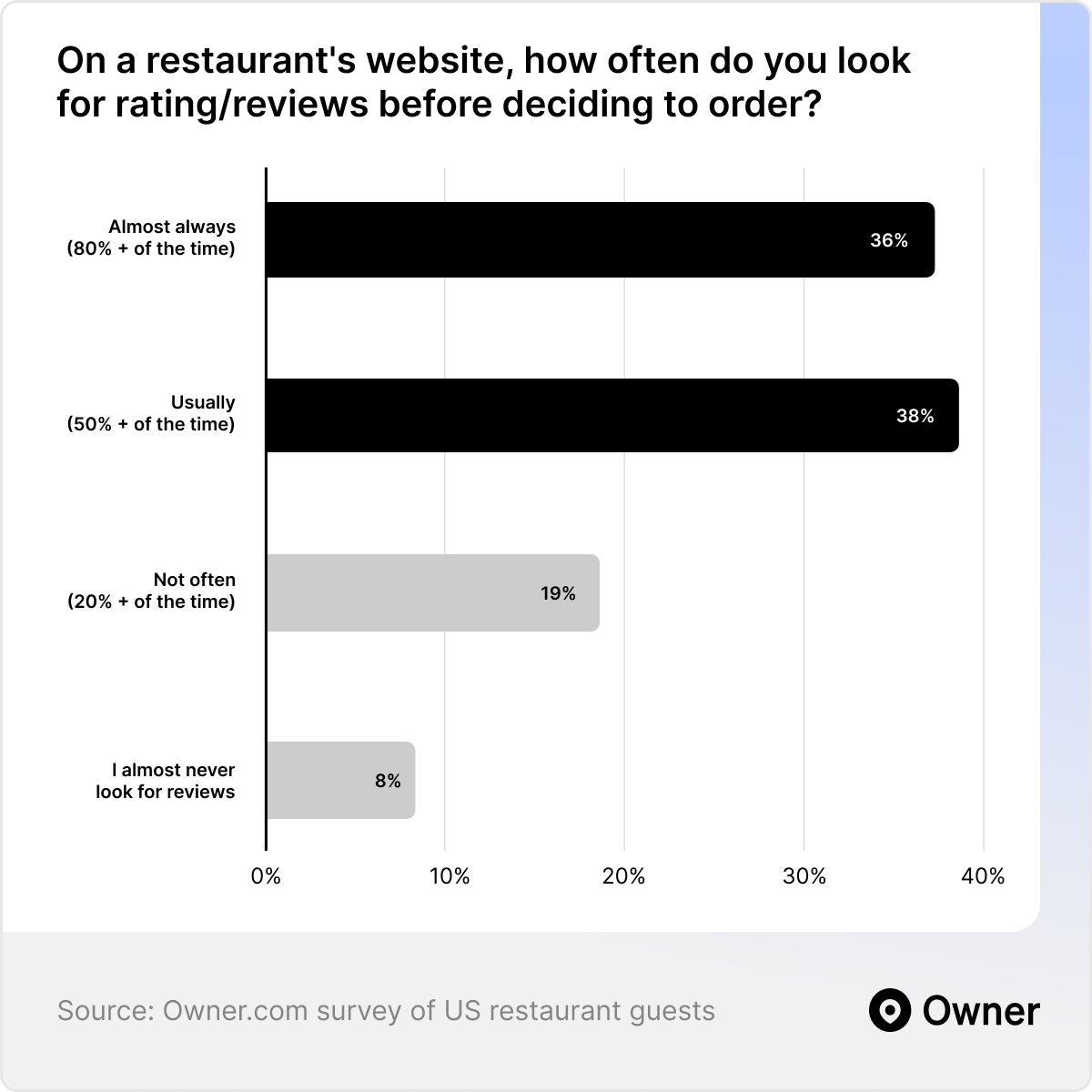
Takeaway #6: 3 out of 4 guests check your website for reviews or special offers
📊 What the data says:
- Social proof puts guests at ease. 74% of guests look for social proof on a restaurant’s website and online menu.
Social proof is a surprisingly popular thing that guests look for on a restaurant’s website. I say surprising because, yes, guests definitely check out third-party platforms. And they may even trust those reviews more.
But they also seek out ratings and reviews from other guests who have ordered directly from you. And it’s comforting to guests to see reviews as they’re browsing your online menu or checking out your website. They may not feel the need to check third-party reviews if you show off great reviews.
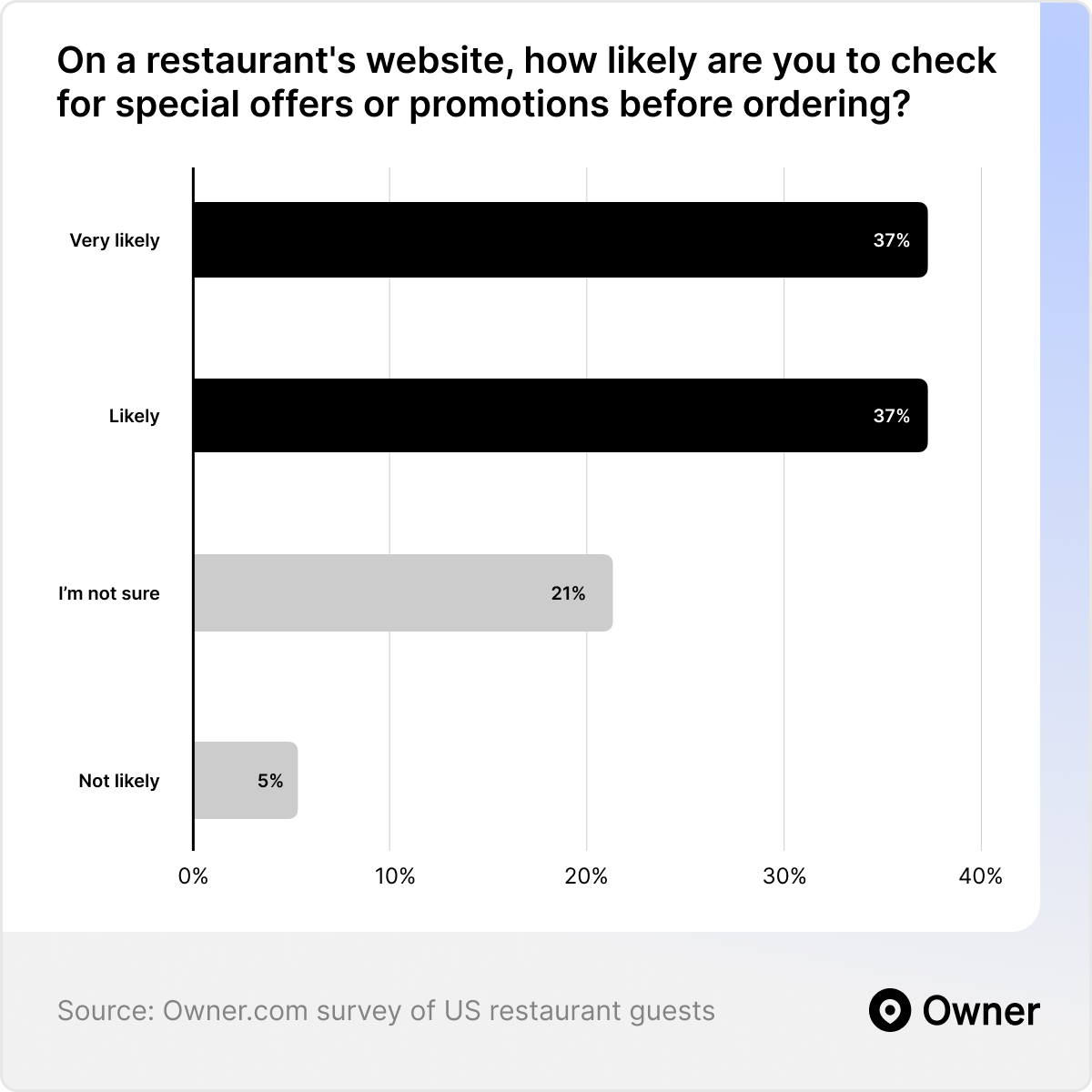
🔍 Zoom in: 74% of guests look for special offers on your website before ordering
📊 What the data says:
- Special offers make your website worth visiting. 74% of guests also say they visit a restaurant’s website to check for special offers or promotions.
The other thing that might convince guests to order? A special offer, direct from your website. At Owner, we’ve found special offers with order minimums increase the number of orders and profit. For example, an offer for $7 off on orders above $50.
That’s good news! Because three-quarters of your guests are checking your restaurant website for these offers. If you want to be extra smart, you can even create offers for your logged-in guests. I.e., guests who have already ordered once.
This could be an offer for a certain % off if they download and order from your restaurant’s mobile app. Owner data shows us regulars who use your mobile app reorder 85% more often. So getting more app users is well worth the initial cost of the discount.
Designing the “perfect” restaurant website
When I talk to restaurant owners about their website, I usually see one of two scenarios:
- The owner is sweating every single pixel and always making minor tweaks to their website.
- The owner is very hands-off and barely remembers they have a website.
I was so excited to share this data is because it will help restaurant owners see their websites the right way. Yes, the data proves your website is very important. But no, you don’t have to become a web designer to make a great restaurant website.
- Guests want clear, modern-looking websites with browsable menus, online ordering, and amazing photography. Information about what you serve is the most important thing of all. But it’s also good to make other details, like where you’re located, easy to find.
- Most guests want to order directly from you. They value a smooth ordering and checkout experience and they’re more likely to reorder if you get it right. Oh, and they love seeing reviews and special offers on your website, too!
It’s that simple—and that hard. There are only a few things you need to get “right” on your website, but they have a really big impact. It’s worth working with an expert to make sure all the little details for your site’s design and SEO are perfect.
Owner.com can help. We’ve built thousands of restaurant websites. And we test everything—from SEO to conversion rates—to help you grow your direct online orders. If that sounds good, schedule a demo with our team and we can partner up.
{{cta-1}}
Frequently Asked Questions
How long does it take to build a restaurant website?
With a modern restaurant website builder, you can have a basic restaurant website live in a few hours to a few days. A fully custom, designer-built site typically takes several weeks to months. Using a restaurant-specific platform is usually the fastest path to a polished, sales-ready site — Owner customers are typically up and running in about one to two weeks, with the design, menu, and online ordering set up for them.
How do I optimize my restaurant website for SEO?
Focus on the fundamentals that help nearby diners find you: put your cuisine and location keywords (like "best tacos in West Loop") in your homepage title and headline, publish your menu as real crawlable text rather than a PDF, and make sure your site loads fast on mobile. Then strengthen your local presence by claiming and optimizing your Google Business Profile and keeping your name, address, and phone number consistent everywhere online. For the full playbook, see our guides on restaurant SEO and local SEO for restaurants.
Are there any best practices to design a high-converting restaurant menu online?
When building an online menu, the goal is to make ordering fast, clear, and profitable. These practices help improve visibility and increase conversions:
- Promote top sellers: Place high-margin, popular items at the top to drive more orders.
- Write clear descriptions: Highlight key ingredients and benefits without overcomplicating the copy.
- Add strong photos: Use high-quality images to build trust and make dishes more appealing.
- Organize items clearly: Group menu items into logical categories for easier browsing.
- Keep the layout clean: Reduce clutter so customers can focus on what to order.
- Add strategic upsells: Suggest sides, upgrades, and add-ons to increase average order value.
How often should I update my menu design?
I’d recommend doing a moderate to full menu design refresh every 12-18 months as a good rule of thumb.
Food trends shift, ingredient costs change and pricing that made sense 18 months ago may no longer reflect your margins. A refresh also gives you a natural opportunity to cut underperforming items, spotlight new ones
Should I include photos on my menu?
You should absolutely include high-resolution images of your food. For casual dining, fast casual and cuisines that are unfamiliar to your customer base—think Ethiopian, Filipino or regional Indian—photos do real work. They remove the guesswork and make customers more confident when ordering something new.
How do I optimize my Google Business Profile for local searches?
Make sure your name, address, and phone number are accurate and consistent across Google and all other online directories. Add high-quality photos, keep your hours up to date, respond to reviews, and use relevant keywords in your business description. These steps help Google understand your restaurant and show it to local diners.
Can I add online ordering to my restaurant website?
Yes — and you should. Adding online ordering directly to your own website lets you take orders commission-free, keep your customer data, and turn website visitors into direct sales instead of sending them to third-party apps. Just make sure the ordering happens on your own site rather than redirecting to an external platform, which hurts both your SEO and your customer relationship. Platforms like Owner build direct online ordering right into your site.
How do I make my restaurant website mobile-friendly?
Use a responsive restaurant website builder that automatically adapts your site to any screen, since the majority of restaurant searches happen on a phone. Beyond that, the essentials are fast load times (compress your food photos and avoid heavy plugins), large tap-friendly buttons for "Order Online" and "Reserve," and text that's easy to read without pinching or zooming. Google uses mobile-first indexing to rank sites, so a smooth mobile experience directly affects both your rankings and your orders — test yours regularly with Google's free Mobile-Friendly Test. Platforms like Owner build every site mobile-first by default, so this is handled for you.