How an Online Ordering System Can Help Restaurants Increase Sales
- The benefits of online ordering for restaurants build on each other: capture the order, grow it, then bring the guest back.
- Owner’s online ordering gets nearly 2x more conversions than a typical restaurant website.
- Upsells suggest add-ons based on what’s in each guest’s cart. One restaurant’s average check grew from $45 to $55 with an online ordering system.
- Every direct order gives you the guest’s contact info, so you can invite them back with email, texts, and your own app.
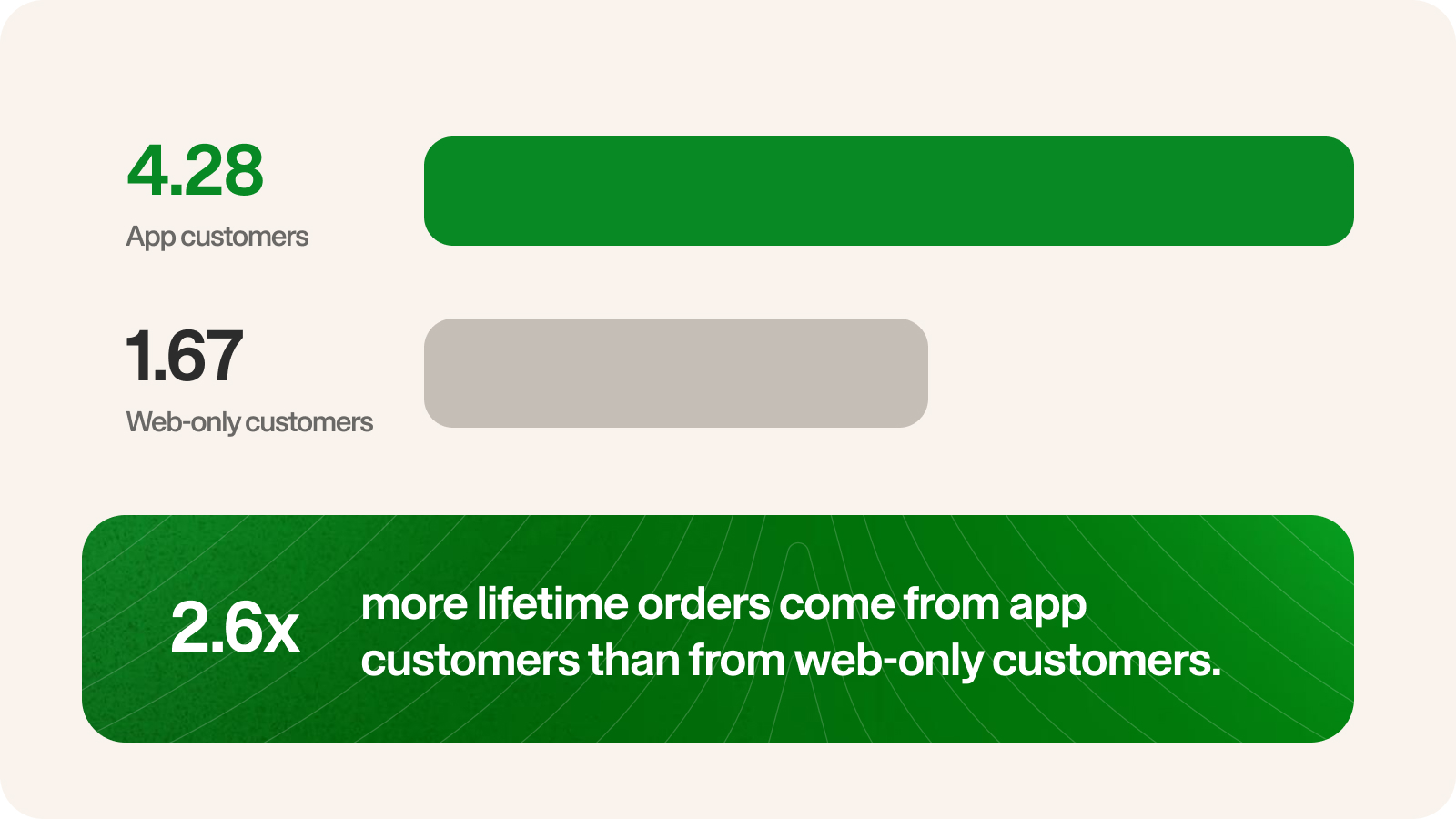
- App customers place about 2.6x more lifetime orders than web-only customers.
Most restaurants offer online ordering in some form, because that’s how a lot of people like to order. What gets talked about less is what it can do for sales.
An order placed on your own website brings in direct revenue. With the right online ordering system, it also tells you more about the customer. That second part is what enables online ordering to keep growing your sales over time.
Here’s how online ordering can increase sales, step by step, and what to look for at each stage.
What is an online ordering system for a restaurant?
An online ordering system lets guests order from your menu on your own website or app. They pick their items, choose pickup or delivery, and pay. The order then goes straight to your kitchen.
The biggest difference between direct ordering and ordering through a delivery app is that on a third-party app, the guest orders from a marketplace full of restaurants. It’s a source of new customers, and plenty of restaurants do well there. But the guest relationship, including the guest’s name, contact info, and order history, stays with the app instead of with you.
That’s one of the main benefits of an online food ordering system: the guest orders from you directly, so you know who they are, what they ordered, and how to reach them again. Most restaurants use both channels. The marketplaces help new guests find you, and your own system gives regulars a direct way to order from you again.
How online ordering increases sales for restaurants
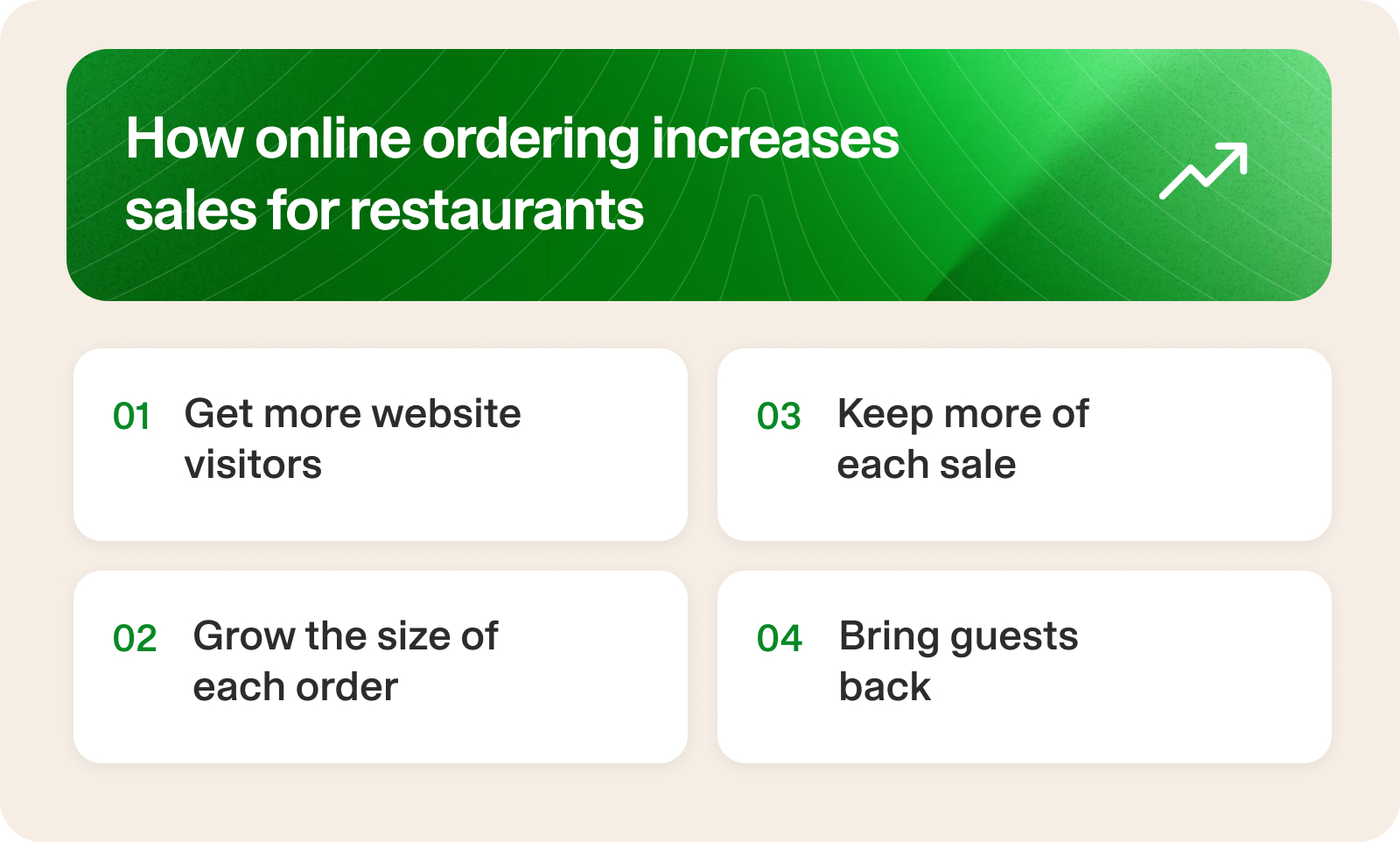
Online ordering grows sales in four steps:
- Get more website visitors to order: More of the people who land on your site find the menu and finish checking out.
- Grow the size of each order: Smart suggestions at checkout raise the average check.
- Keep more of each sale: Direct orders come without the per-order fees that cut into your margins.
- Bring guests back: Every direct order adds a guest to your list, which you can use to drive repeat orders.
It’s easy to think of these as four separate online ordering benefits. In practice, each step depends on the one before it.
You can’t bring back a guest you don’t know, and you only get to know a guest once they finish an order. That’s why conversion comes first. Every completed order adds to your sales today and adds a guest to your list for later. Bigger orders and lower fees make each of those orders worth more. Then repeat orders start the cycle again, with guests who already know how to order from you.
Let’s go over how each of these steps works.
Step 1: Get more of your website visitors to actually order
Most restaurants already get visitors to their website. People check the menu, the hours, or whether you deliver. The question is how many of them find the menu and finish an order.
That’s conversion, and it’s where online ordering starts adding sales. When more of the guests already on your site finish an order, sales grow without any extra traffic needed.
There are three things drive conversion on your online ordering website:
Ordering that lives on your own site
When a guest taps “Order online,” they should land right on your menu. Some ordering setups send guests to a separate website instead, one with a different look and sometimes a second login.
For a guest, this jump can feel like they’ve left your restaurant. They might wonder if they clicked the wrong link, or stop to create an account they didn’t expect to need. Every extra step gives them a reason to close the page before they finish their order.
Keeping ordering on your site avoids that. The guest sees the same logo, colors, and menu from the moment they arrive to the moment they pay. Ordering feels like a natural next step.
A mobile-friendly experience
A lot of online orders happen on a phone, in a few spare minutes. Research from Owner found that 95% of customers use a mobile app to place takeout and delivery orders.
The checkout has to work well on a small screen to capture these orders. In practice, that means mobile ordering should include:
- Saved details: Returning guests don’t retype their name, address, or card.
- Few taps: A guest can go from menu to confirmed order quickly.
- No dead ends: Every screen has a clear next step, with no pop-ups covering the menu and no buttons too small to tap.
Testing your ordering page
Most ordering pages are set up once and never touched again. The button works, orders come in, but nobody checks whether a different setup would bring in more.
Getting more guests to finish an order means looking at your ordering page with fresh eyes every so often. A few places to start:
- Your menu layout: Is it easy to scan on a phone? Are your best-sellers near the top? Do your food photos look appealing?
- The checkout steps: Place an order yourself and count the steps. Your ordering system’s reports can also show you where guests leave before finishing their order.
- Test the results: When you update something, compare your orders for the next few weeks with the weeks before. That way you know which changes helped.
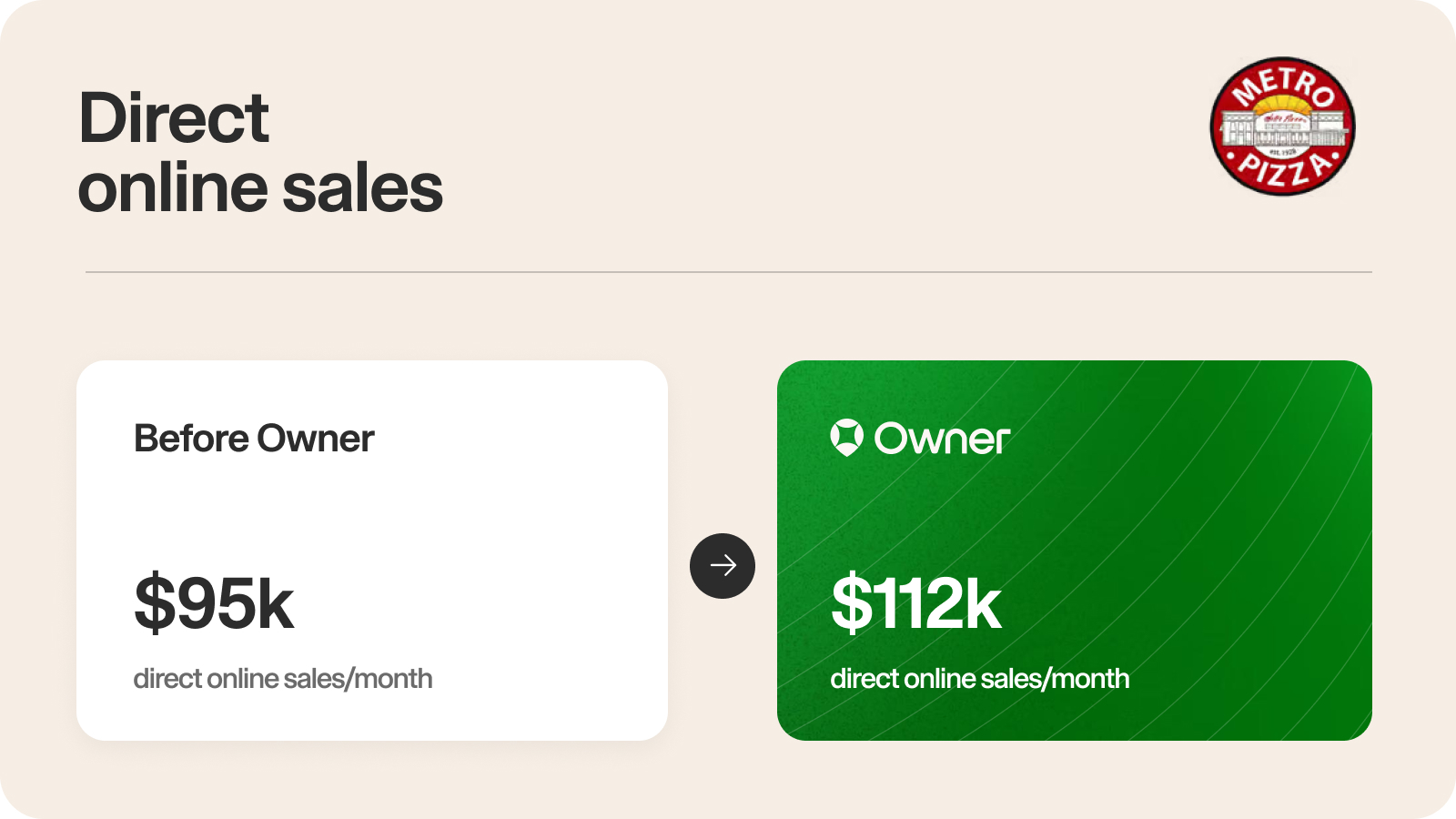
The ordering system itself also matters. Take Metro Pizza, for example. Founders Sam and John opened the restaurant more than 35 years ago. By 2023, they felt their online ordering had fallen behind. Their old system looked dated, and it wasn’t helping them grow sales. After switching to a new ordering system and app, direct online sales grew from $95,000 a month to $112,000 a month. Guests using the new system rated it 4.9 out of 5 stars, just a few months after launching the app.
Step 2: Increase your average order size with smart upsells
Once a guest is ordering, the next way to grow sales is to increase the size of that order. A good server does this naturally. They suggest a side, a drink, or a dessert that goes with what the guest ordered. Online ordering can do the same thing at checkout, on every order.
Small increases add up. For example, an extra $5 on 500 orders a month is $2,500 in added sales, from guests who were already ordering.
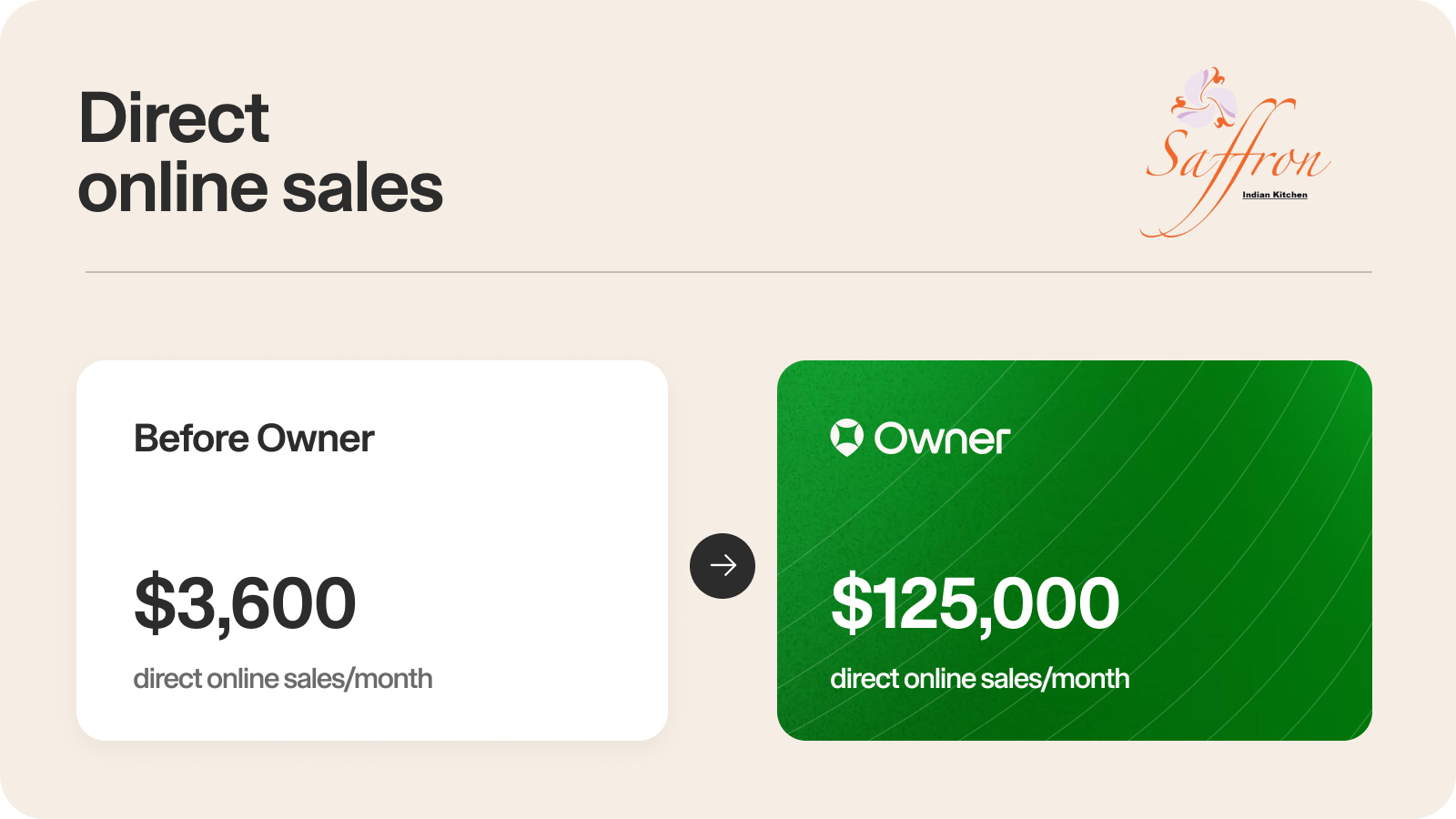
A great example of this comes from Saffron Indian Kitchen. Rahul Bhatia opened Saffron to bring his favorite Indian food to his Pennsylvania community. He wanted to create a better online experience to capture a younger audience and build a bigger customer base. After launching an online ordering system, Saffron’s average check grew from $45 to $55 and direct online sales grew from $3,600 a month to $125,000 a month.
Step 3: Keep more profit from each order
The first two steps bring in more orders and bigger ones. The third step is about how much of each order you keep.
Every order comes with some cost, whatever channel it comes through. Card processing, packaging, and the system that takes the order all cost something. What changes from channel to channel is how big that cost is, and whether it grows every time your sales do.
When a guest orders directly from your website or app, you keep more of the sale. Direct ordering works well alongside the delivery apps. Many restaurants keep using them as a way for new guests to find them. Their own channel is where regulars order again.
Keeping more of each order also makes the first two steps worth more. Every extra order from Step 1 and every add-on from Step 2 turns into more profit for your restaurant.
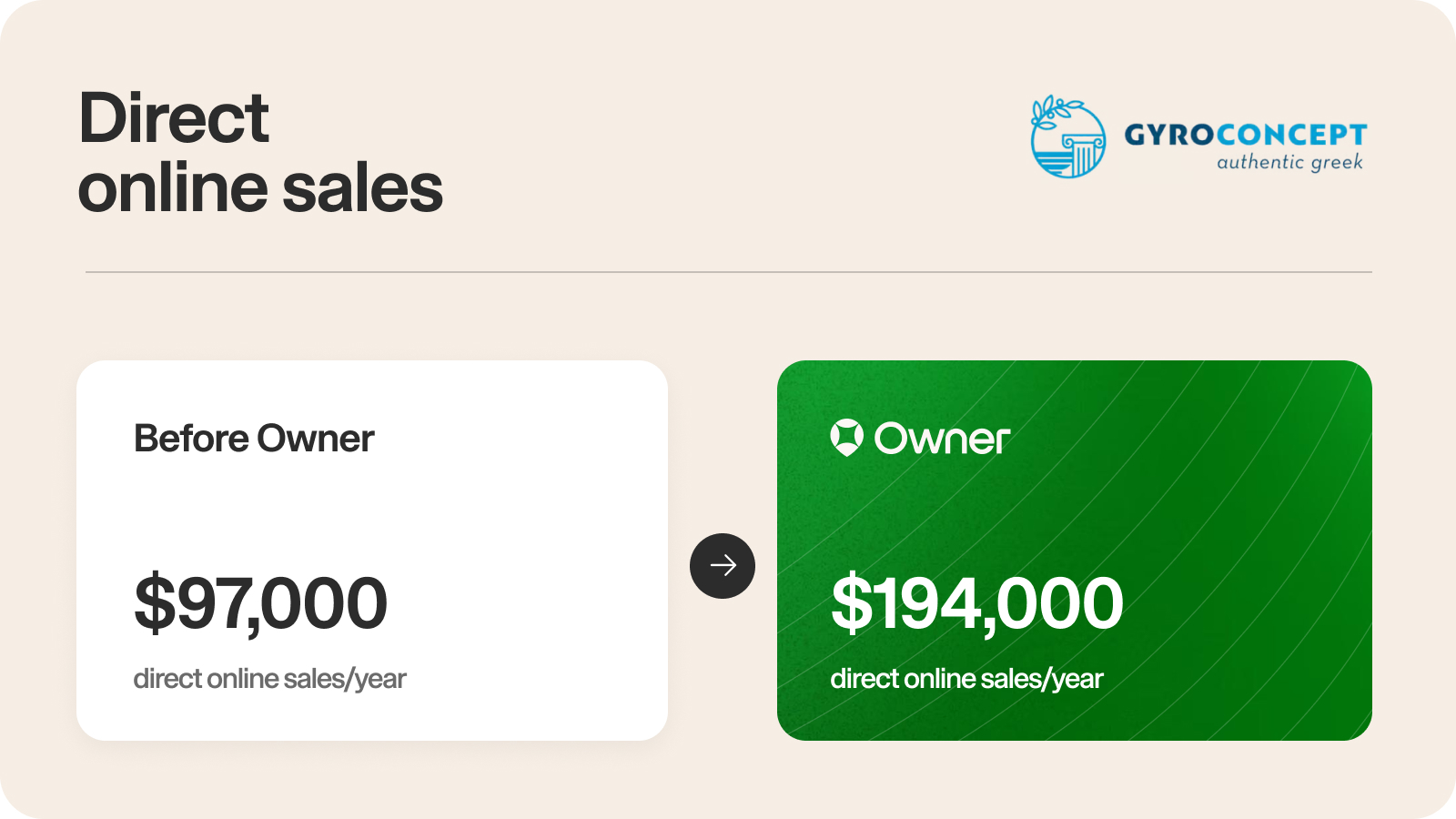
Take Gyro Concept, for instance. Nikitas Bouras runs the Greek fast-casual restaurant in eastern Pennsylvania. His team juggled multiple tablets from several ordering platforms, which created operational challenges and came with varying fees. After moving to one online ordering system, Gyro Concept grew its direct orders by 100% and increased online sales to $194,000 a year. With better systems and more profit per order, Nikitas is now planning new locations in New Jersey and New York.
Step 4: Build a customer list and drive repeat orders
Every direct order tells you who the customer is. You get their name, phone number, email, and what they ordered. Over time, those orders add up to a guest list your restaurant owns.
Look at your customer list as a tool. A guest who has already ordered from you needs a reason to order again. There are a few ways to do that.
Email and text campaigns
Targeted messages work best timed around moments when people are already thinking about food. Game days, holidays, and long weekends are natural fits. A Super Bowl campaign, for example, can send a reminder before the game, a message on game day, and a follow-up afterward.
A few things make campaigns more likely to bring in orders:
- Plan around the calendar: Map out the big food moments for the year ahead so you’re not scrambling the week of.
- Keep the message simple: One offer and one link to order is easier for guests to act on than a full newsletter.
- Match the message to the customer: Someone who orders every week needs a different nudge than someone who hasn’t ordered in two months.
Writing campaigns between the lunch and dinner rush is hard. That’s why many restaurants choose an ordering system that sends marketing messages automatically.
Your own branded app
When a restaurant has its own branded mobile app, it sits right on the guest’s home screen. Reordering takes a few taps instead of a full search.
Owner’s data found that app customers averaged 4.28 lifetime orders, compared with 1.67 for web-only customers. That’s about 2.6 times more orders. Their lifetime value was around $170, compared with around $78. Results depend on the restaurant, but that difference shows why getting customers onto your app matters.
The best time to invite a guest to download your app is right after they’ve ordered on their phone. At this moment, they’ve just had a good experience and the next order is fresh in their mind.
Loyalty and rewards
Loyalty programs give guests a reason to pick you again instead of whatever’s closest. Guests earn points every time they order and can see their progress toward the next reward right in your app.
To make a loyalty program work:
- Keep rewards within reach: A reward that takes 30 orders to earn feels unattainable. Set levels, starting with 10 orders to reach the first reward.
- Show progress where guests order: When guests can see their points in your app, every order feels like it’s adding up.
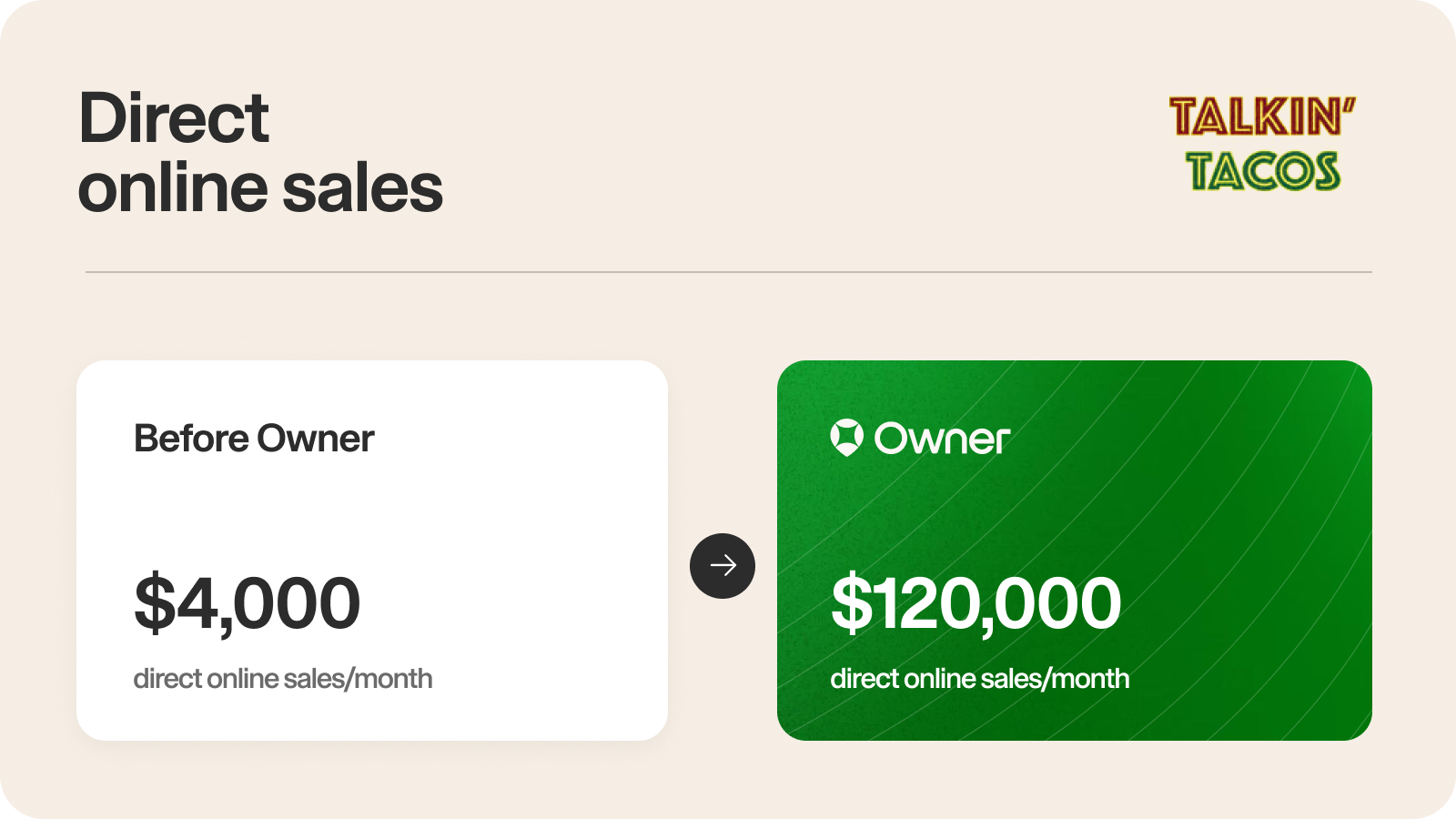
Take Talkin Tacos shows how these channels work together. Mo and Omar started Talkin Tacos as a food truck. Now they have a guest list of over 40,000 customers, with tens of thousands enrolled in their loyalty program. More than 10,000 guests downloaded their app within 90 days of launch.
Those regulars keep ordering directly. Talkin Tacos’ direct online sales has grown from $4,000 a month to $120,000 a month, and the restaurant has done over $7 million in direct online sales with Owner.
How Owner runs online ordering for restaurants
Owner runs all four steps as one connected growth system. The ordering page, the upsells, the customer list, and the campaigns that bring guests back all share the same data. When a guest places an order, that order shapes what they’re offered next time and when they hear from you again.
Here’s how that plays out at each step.
More visitors finish their orders. Owner’s online ordering gets nearly 2x more conversions than a typical restaurant website, and it keeps improving after you launch. Owner’s team runs tests across thousands of restaurants to find what gets more guests to finish an order, looking at things like menu layout and checkout steps. When a change leads to more orders, it goes out to every restaurant on Owner automatically. Results vary by restaurant, but your ordering page gets the benefit of every test without you rebuilding anything.
Orders get bigger. Owner’s Smart Upsells suggest add-ons based on what’s in the guest’s cart. Someone ordering tacos might see an option to add a quesadilla or a drink, for instance. The suggestions use data from thousands of restaurants, so they reflect what guests actually add to their orders. There’s nothing to set up. The default suggestions are built to raise your average order value over time, and you can review and adjust them anytime in the Owner dashboard.
You keep more of each sale. On Owner’s Flat Rate plan, you pay one monthly price with no restaurant fees per order, so a busier month doesn’t mean a bigger bill. Restaurants that are just starting to build their online sales can choose a lower-cost plan with a small per-order fee instead.
Guests come back. Owner sends proven email and text campaigns to your guest list automatically. If there’s a holiday coming up, Owner will automatically send customers an email with a limited-time coupon code.
Grow your sales with online ordering
The advantages of an online ordering system add up one step at a time. More visitors finish their orders, those orders get a little bigger, you keep more of each one, and every guest you capture gets a reason to come back.
With Owner, each step feeds the next. See how it could work for your restaurant. Get a free demo.
Online Ordering FAQs
What is onsite online ordering (OLO)?
"OLO" refers to onsite online ordering, which is online ordering that lives on your website, as opposed to online ordering that links out to a third-party website. OLO is great for restaurants since it helps you own your customer relationship from end-to-end, reduces any commission fees, and is better for your restaurant website's SEO performance.
What should I look for when choosing an online ordering provider?
Focus on platforms that fit your operational needs and long-term growth goals. Key factors include seamless integration with your POS and website, strong menu management tools, reliable uptime, and clear pricing with no hidden fees.
Also evaluate how easy the system is to use for your team and your customers. Look for built-in features that support growth such as marketing tools, analytics, customization options, and upgrade paths. These features will allow your platform to scale with your restaurant, without forcing another migration later.
Can I add online ordering to my restaurant website?
Yes — and you should. Adding online ordering directly to your own website lets you take orders commission-free, keep your customer data, and turn website visitors into direct sales instead of sending them to third-party apps. Just make sure the ordering happens on your own site rather than redirecting to an external platform, which hurts both your SEO and your customer relationship. Platforms like Owner build direct online ordering right into your site.