SEO Keywords for Restaurants: Step-by-step Guide
I’ll show you how to find the keywords your customers actually search for, decide which ones to go after first, and put them on your website so more people find your restaurant.

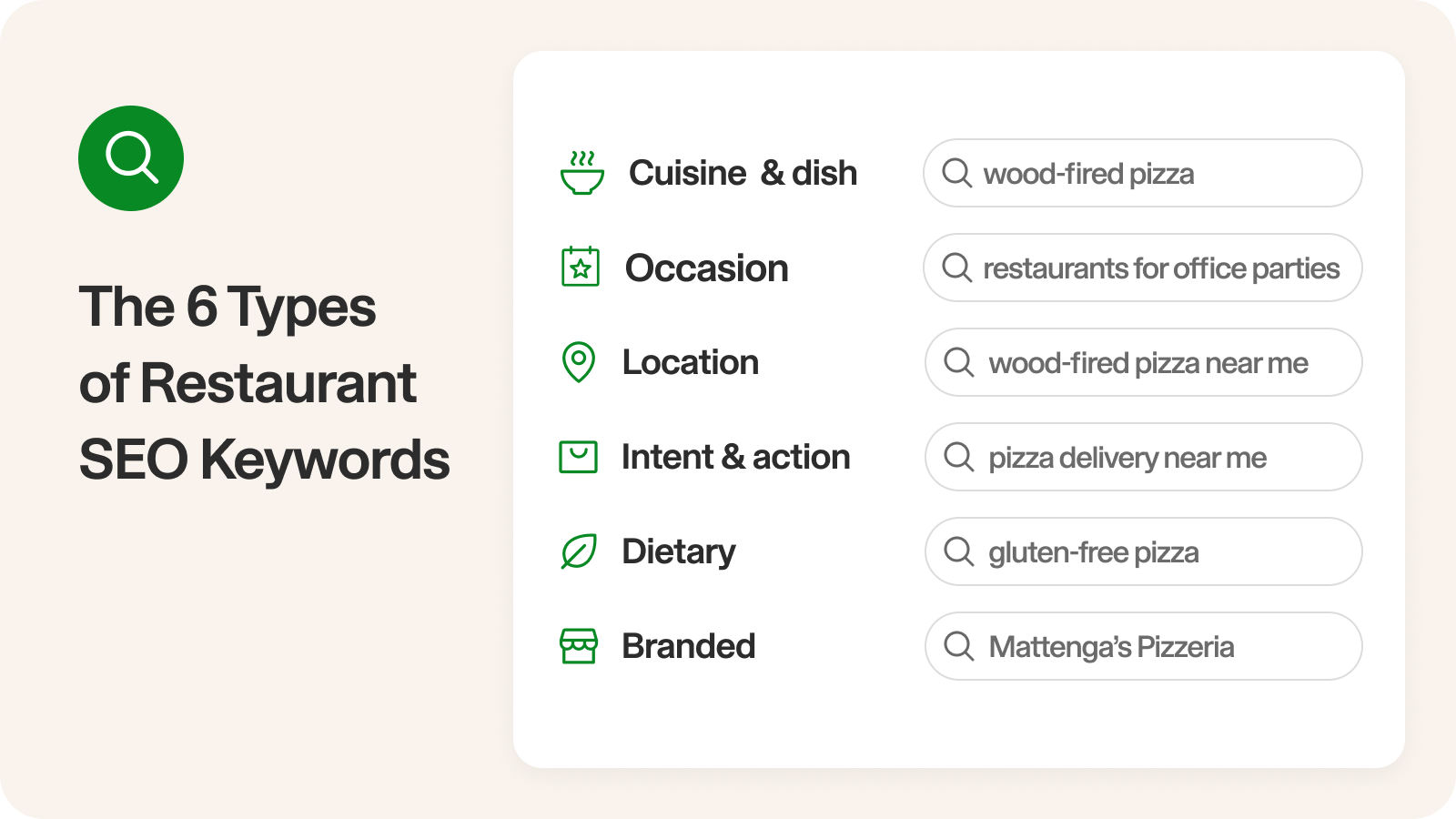
- Restaurant keywords fall into six types. Cuisine and dish, location, intent and action, occasion, dietary, and branded. Combine them to match how real diners search.
- Start with brainstorming ‘seed’ keywords for your restaurant. Use your cuisine, top dishes, location, how you serve customers, and your reviews to brainstorm a starter list of search terms customers would use to find you.
- Don’t pay for an expensive SEO keyword generator. Use tools like Google’s autocomplete function, People Also Ask section, Google’s Keyword Planner, Google Trends, and Google’s Search Console all reveal more keywords at no cost. You can also start free trials of more advanced SEO tools.
- Prioritize winnable keywords. With free tools, look for search terms with decent search volume, low-to-medium difficulty, and a clear relation to what you sell.
- Map one primary keyword to each page. Put it in the page title, meta description, and H1, then track impressions and clicks within Google Search Console, and actions on your Google Business Profile to see if it’s working.
What Are SEO Keywords for a Restaurant?
SEO keywords for restaurants are the common terms and questions that potential patrons will enter into search engines. The most common search terms are “[Cuisine] near me” and “Best [cuisine] in [location].” For example, a tourist is visiting Austin, Texas. They want authentic Texan BBQ, so they open Google Search and ask, “The best Texas BBQ in Austin.”
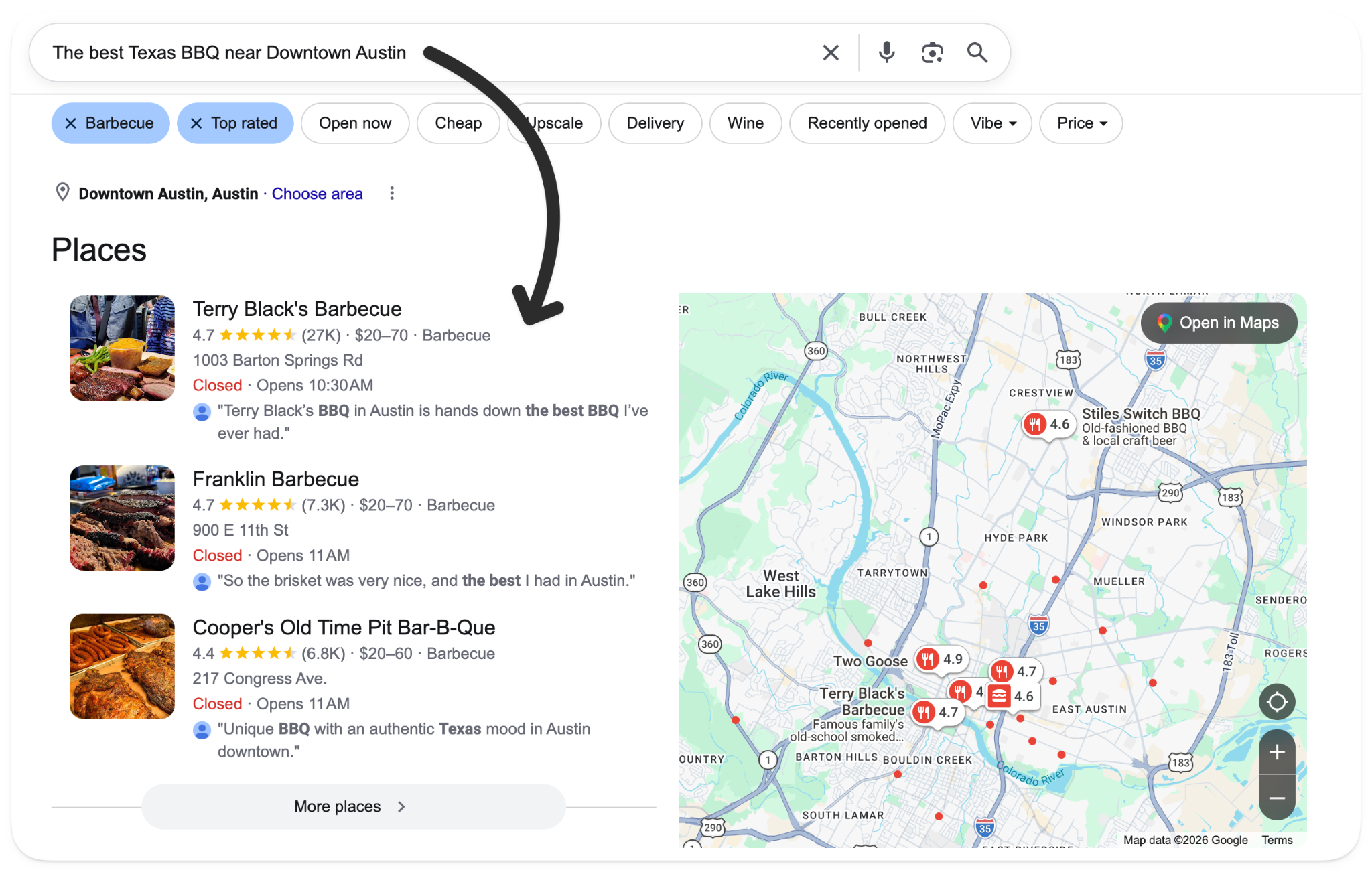
They scan the top Map Pack results and choose a restaurant. Showing up in these top three results is the crux of each restaurant’s SEO strategy.
In this article, I’ll unpack the six types of SEO keywords. These are the fundamental terms that your website and content need to answer, like your main cuisine, location, and why potential patrons should choose your restaurant.
I’ll show you how to identify the seed keywords, which are the foundation of your wider keyword list. And I’ll also provide tools that show how many people search for these different keywords.
If you want your restaurant to show up more often in Google Search and on Google Maps, let’s dive into the main types of SEO keywords for restaurants.
The Six Types of SEO Keywords Restaurants Rank For
Potential customers will search for restaurants in different ways. Someone with a gluten allergy searches differently than someone looking for a good first date vibe.
It’s easy to figure out what SEO keywords apply to your restaurant. Just fill in what applies to your restaurant into these six main groups of SEO keywords:
- Cuisine and dish - the main dishes you serve.
- Location - the area you’re in.
- Intent and action - whether it’s dine-in, takeout, order online, or reservation only.
- Occasion - if your restaurant is geared toward events like sports or office parties.
- Dietary - if your restaurant focuses on a particular diet, like vegan.
- Branded - your name, what someone would search if they were looking for your restaurant.
Let’s dive into each, because these will become the foundation of your content strategy afterward.
1. Cuisine and dish
“What do you want to have for dinner?” The classic question your customers ask. It’s also the primary way new customers will find you.
Your customers will find you based on your signature cuisine type or famous dish.
For example, customers use search terms like:
- Wood-fired pizza
- Fresh catch seafood
- Italian pasta
- All-you-can-eat sushi
These are the fundamental keywords that will bring relevant traffic to your listings and website.
Customers will pair these broad keywords with their location.
2. Location
Potential customers will base their search on what they’re looking to eat and how far it is from their current location. For example, let’s use the cuisine keywords from above. Paired with a location, the keywords look like this:
- Wood-fired pizza near me
- Fresh catch seafood in Naples, Florida
- Made-to-order Italian pasta in the Upper East Side
As you pair your main dish with your primary location, you get more specific with your target keywords. Let’s now look at how people want to dine and expand our keyword list even further.
3. Intent and action
Customers may want to dine in, make a reservation, order online, get it delivered, or perhaps organize catering for an event. Their searches will reflect that.
Customers will search based on how they want to dine. For example, a customer will search for:
- Wood-fired pizza near me with delivery
- Fresh catch seafood in Naples, Florida with catering
- Online ordering genuine Italian pasta in the Upper East Side
Customers will start their searches with what they want to eat. They’ll narrow it to where they want to eat and how they want to receive it.
If you’re following along building your own list of keywords, these are getting very specific, which is good.
Let’s keep going.
4. Occasion
So far we’ve talked about what people want to eat, where they want to eat, and how they want to get it. Now let’s look at why they want to dine out.
Are they booking a reservation with you because they’re celebrating an anniversary? Are they catering a corporate event? Are they planning to watch a big sporting event, like the Super Bowl?
Potential customers will narrow their searches even further by specifying the occasion for dining out.
Their searches will look like this:
- Corporate catering wood-fired pizza near me with delivery
- Bars in Naples, Florida to watch the Super Bowl
- Romantic restaurants in Manhattan to celebrate an anniversary
Think of all of the occasions that would bring customers to your restaurant and include those in your growing list of keywords.
5. Dietary
Customers will also add the qualifiers to their searches to narrow their results further. These qualifiers are dietary restrictions or specialties.
For example, some customers will search for vegan restaurants near them. Others will search for gluten-free bakeries.
Think of all of the restrictions someone might have when they come to your restaurant.
- Vegan dishes
- Gluten-free
- Paleo diet
- Free-range animals
- Catch of the day
If your restaurant specializes in these kinds of restrictions, you should add them to your list. We’ll use them later to inform your content strategy.
6. Branded
The last way that customers will search for your restaurant is by name. Include in your list of keywords your restaurant name or any shortened versions of it. For example, my restaurant is called Mattenga’s Pizzeria, but most people search for us by saying, “Mattenga’s”.
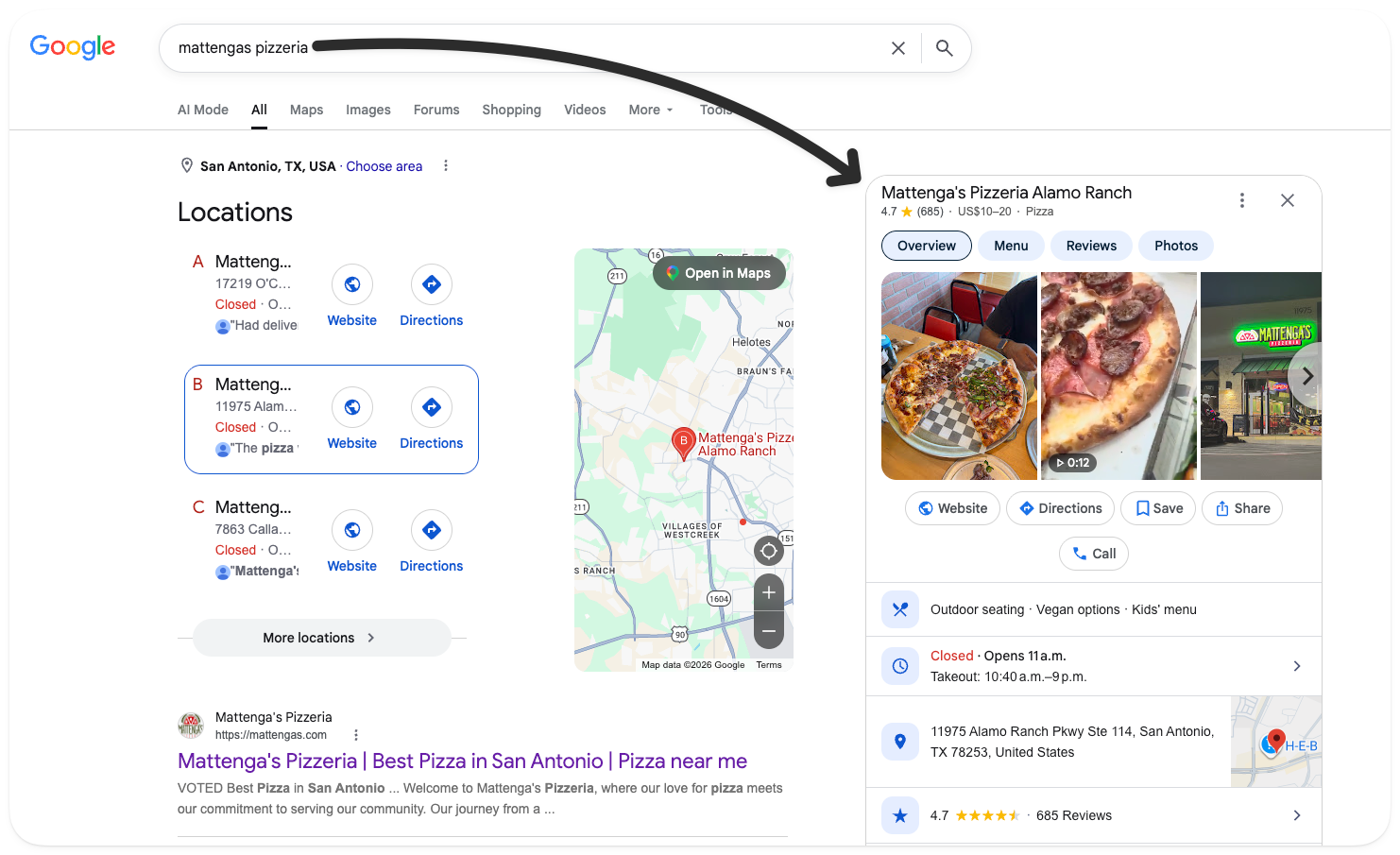
Fill out the combinations like this:
- [Restaurant] + [main dish]
- [Restaurant] + [cuisine type]
- [Restaurant] + [specials]
Now that you’ve brainstormed the types of keywords that fit each of these six categories, let’s talk about how you can find related keywords, further growing this list you’ve started.
How to Find SEO Keywords for Your Restaurant
Now that you’ve brainstormed potential keyword ideas across the six main categories, it’s time to turn them into a concrete list of priorities you can chase. Your initial list will be your seed keywords. We’ll expand it with free online tools that provide real search data for each keyword or suggest related ones. We’ll use this data to prioritize the most important keywords.
Let’s walk through the process with a real example. Salud is a fast-casual restaurant. They make salads, wraps, açai bowls, and smoothies. Their owner, Aaron Smith, has two locations in Portsmouth, New Hampshire, and describes Salud as “seed oil free…it’s just real food.”
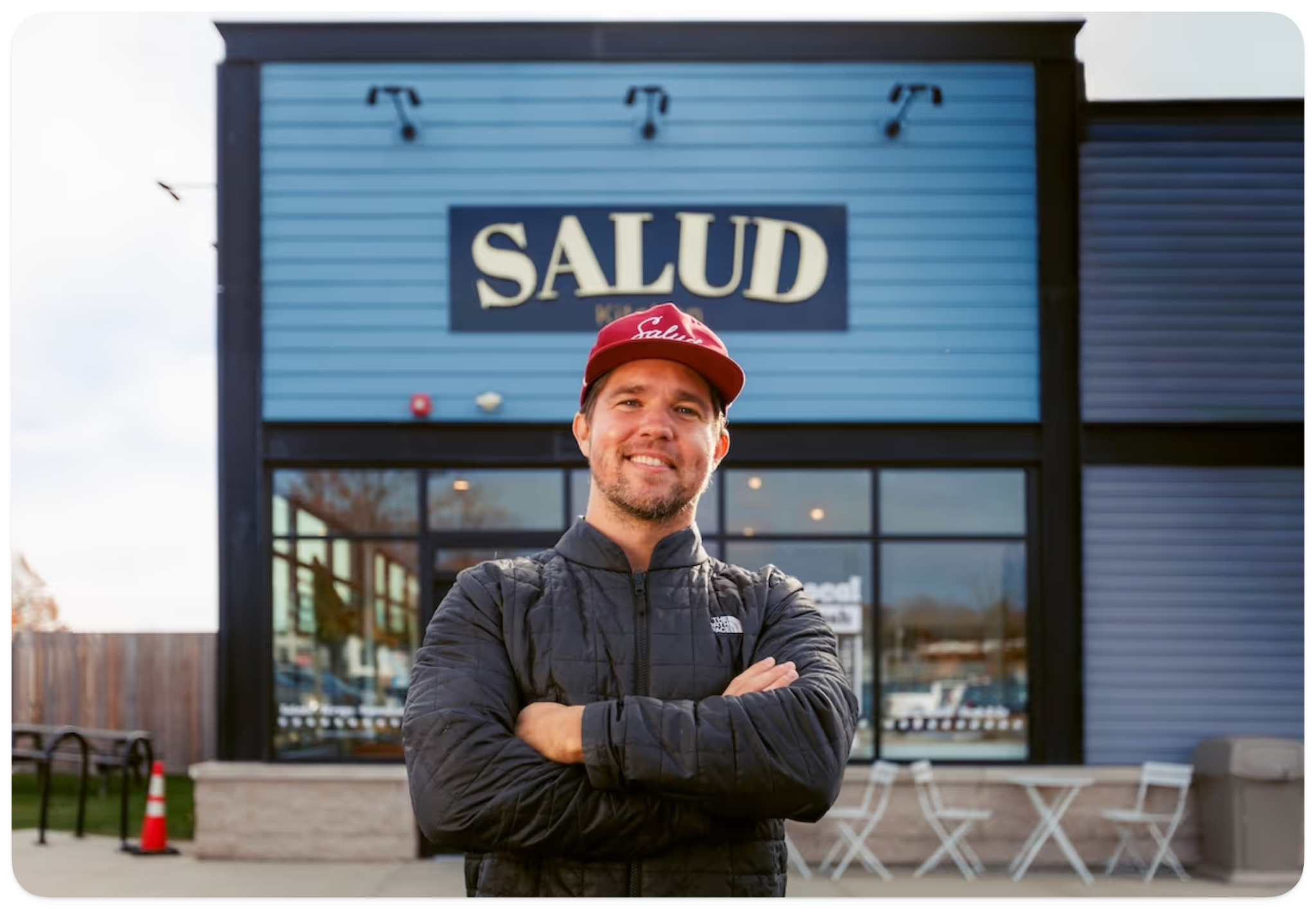
Let’s see how Aaron could build a list of SEO keywords for his restaurant that’d help drive more sales across his two locations.
Step 1. Build Your Seed Keyword List
Seed keywords are the broad 1-2 word terms that capture the core of your restaurant. They become the foundation of our keyword list. Everything else on top of it becomes more specific variations.
Recall the six categories of restaurant keywords. The most important are your primary cuisine type, the top dish, your neighborhood, and how you serve (online ordering vs. reservations).
Start with the main cuisine you offer. In Salud’s case, that’s healthy, fast-casual food.
Next, his primary dishes are salads, wraps, and açai bowls.
He’s located in Portsmouth, New Hampshire. And his restaurant is primarily takeout and online ordering.
Based on that information, what would you say his seed keywords are? Here’s where we can start:
- Healthy restaurants Portsmouth
- Açaí bowls Portsmouth
- Smoothies Portsmouth
- Salads near me
- Wraps Portsmouth
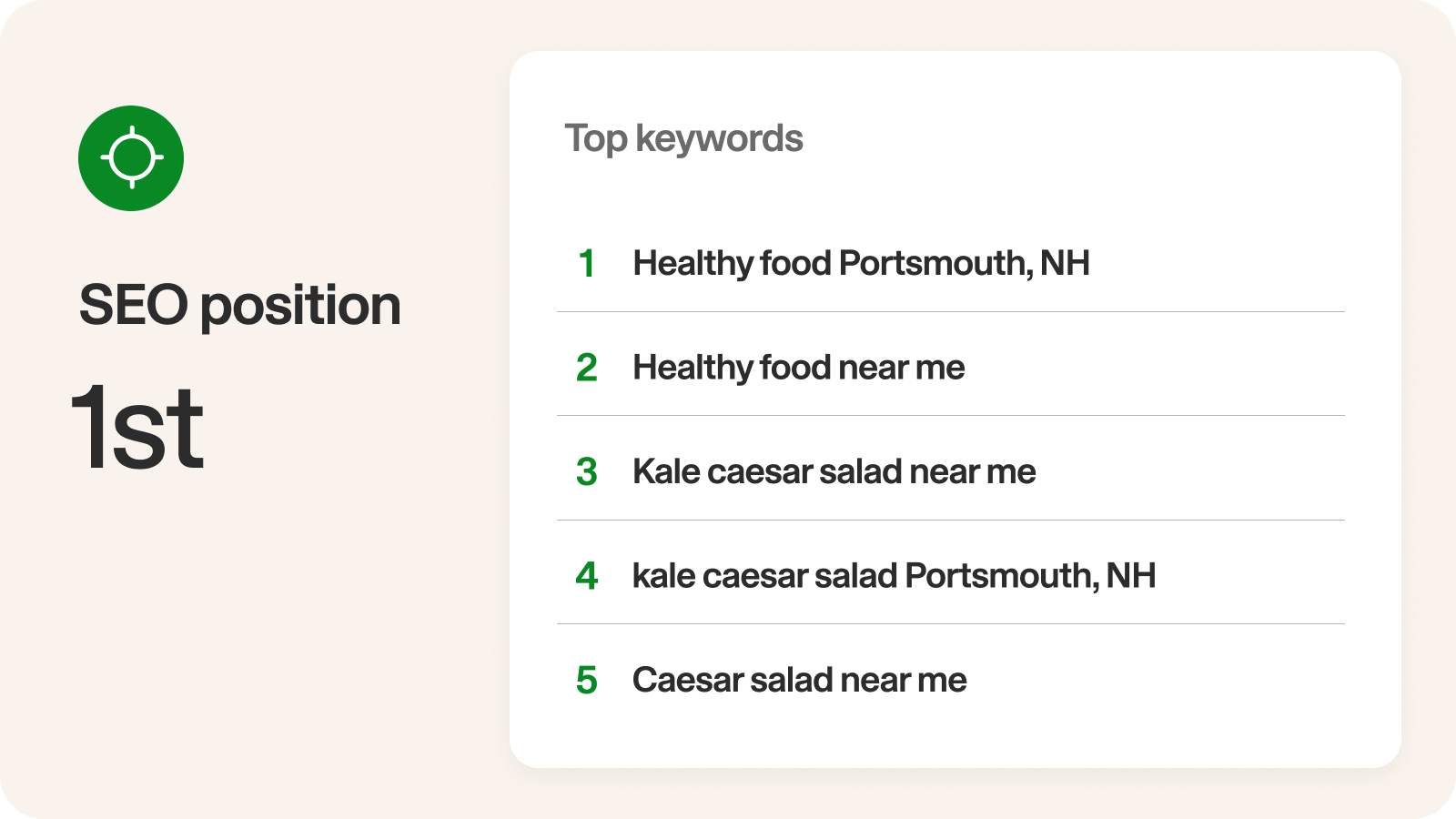
So we’ve brainstormed these keywords, based on what we know about Salud. But can we make it more data-backed? I’m glad you asked!
Let’s look at Salud’s Google Business Profile.
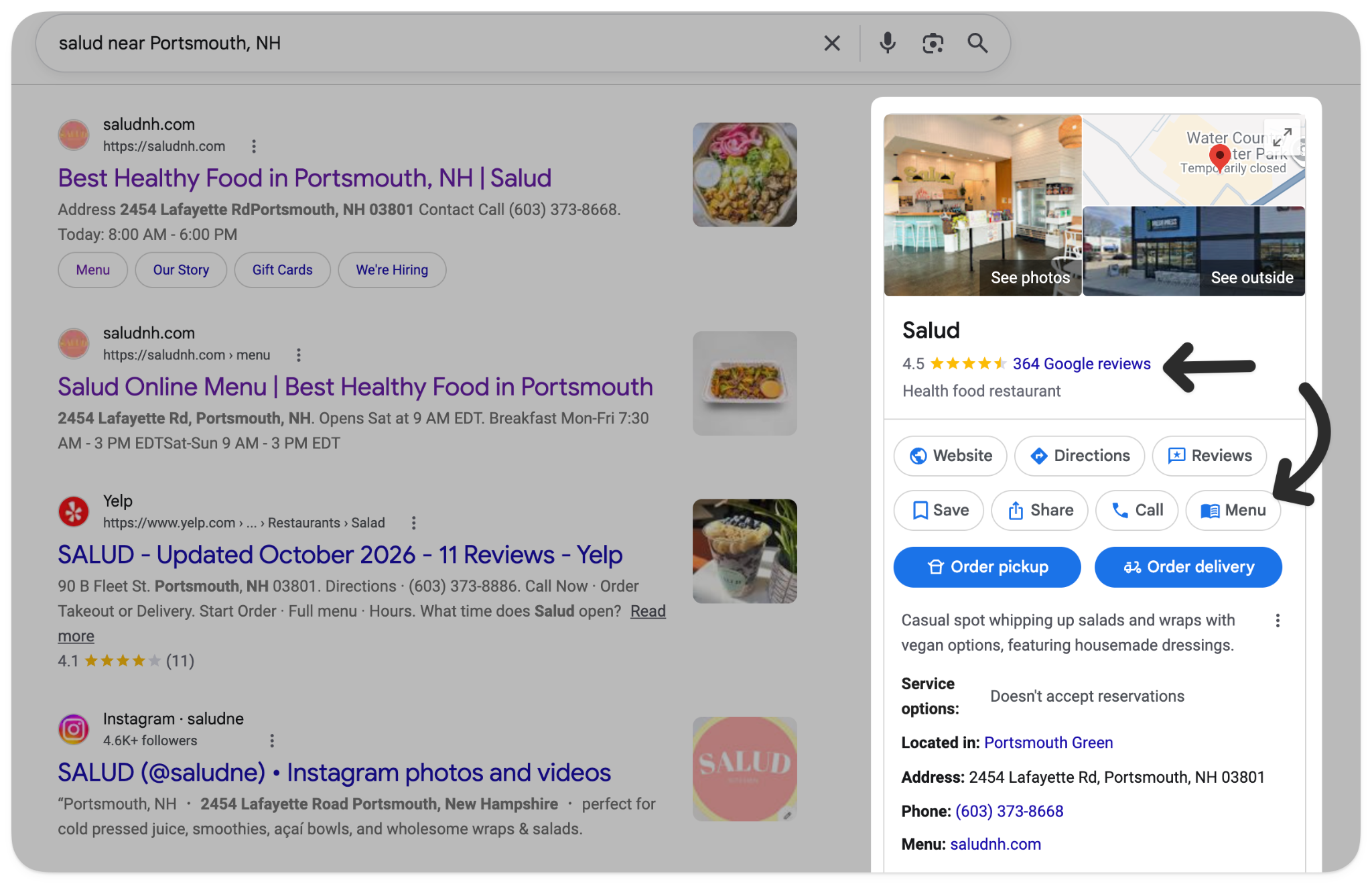
We can get more seed keyword ideas by looking at his menu and his online reviews. Review the main terms that people use when they describe the restaurant. Just scanning through the reviews, let’s look at what’s sticking out.
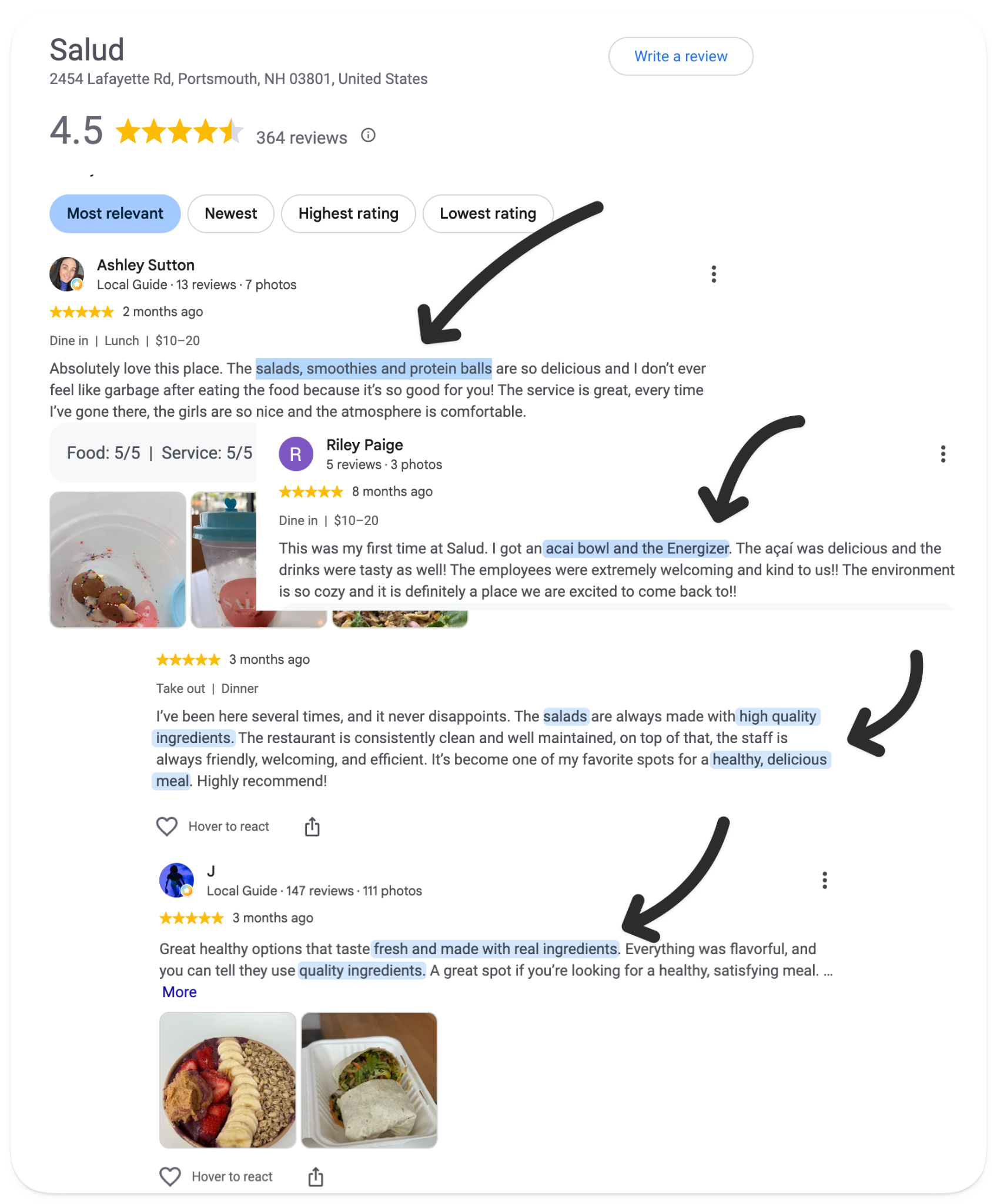
Terms like “High quality ingredients,” “Real ingredients,” “Clean food,” “Salads,” “Protein balls,” and more. We can add these to our seed keyword list.
This aligns well with what’s already on Salud’s menu.
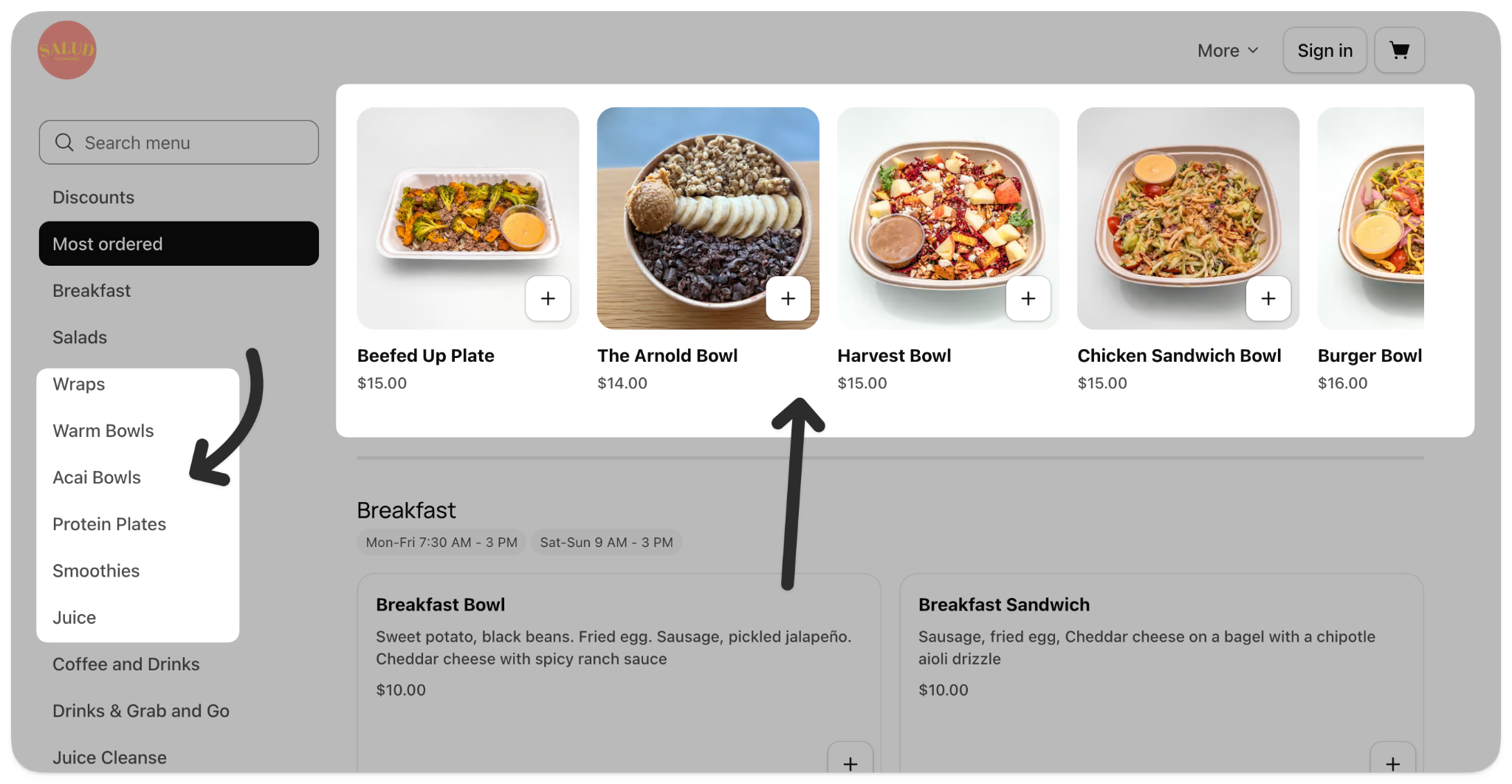
Okay, now that we have a list of 10-12 seed keywords, let’s use free tools to start to understand the existing organic search volume and how difficult it is to get traffic from these keywords.
Step 2. Expand It With Free Tools
There are several free tools to help you expand the seed keyword list that you’ve already built. Some of them also give you estimated search volume for those keywords so you know if a search term is popular or not.
There are five free methods I want to show you:
- Google autocomplete
- People Also Ask in Google Search
- Google Keyword Planner
- Google Trends
- Search Console (If your website has this set up)
Google Autocomplete
First, let’s look at Google Autocomplete. Type in one of your seed keywords and see what the dropdown menu shows you for more specific versions of that keyword that people also search for.
Let’s take the seed keyword, “açai bowls.” Here’s what we see:
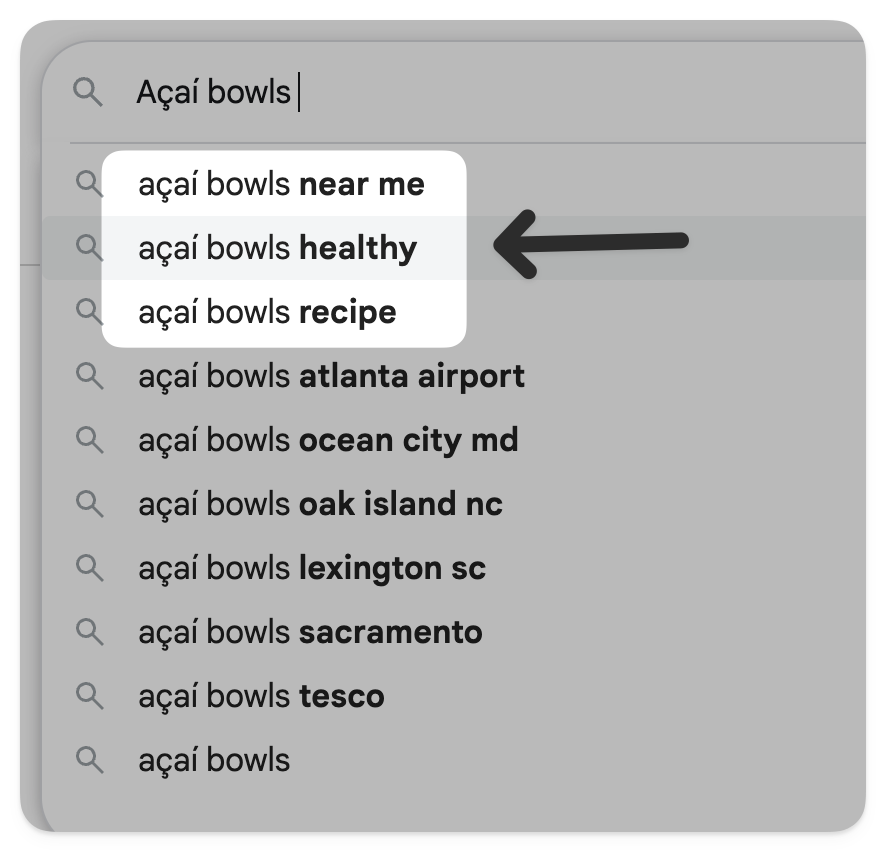
See how it expands my search term into longer-tail keywords. These are all potential keywords you can add to your list.
People Also Ask section in Google Search
The next method is the People Also Ask section. After you search “açai bowls,” scroll down, and you’ll see this drop-down menu.
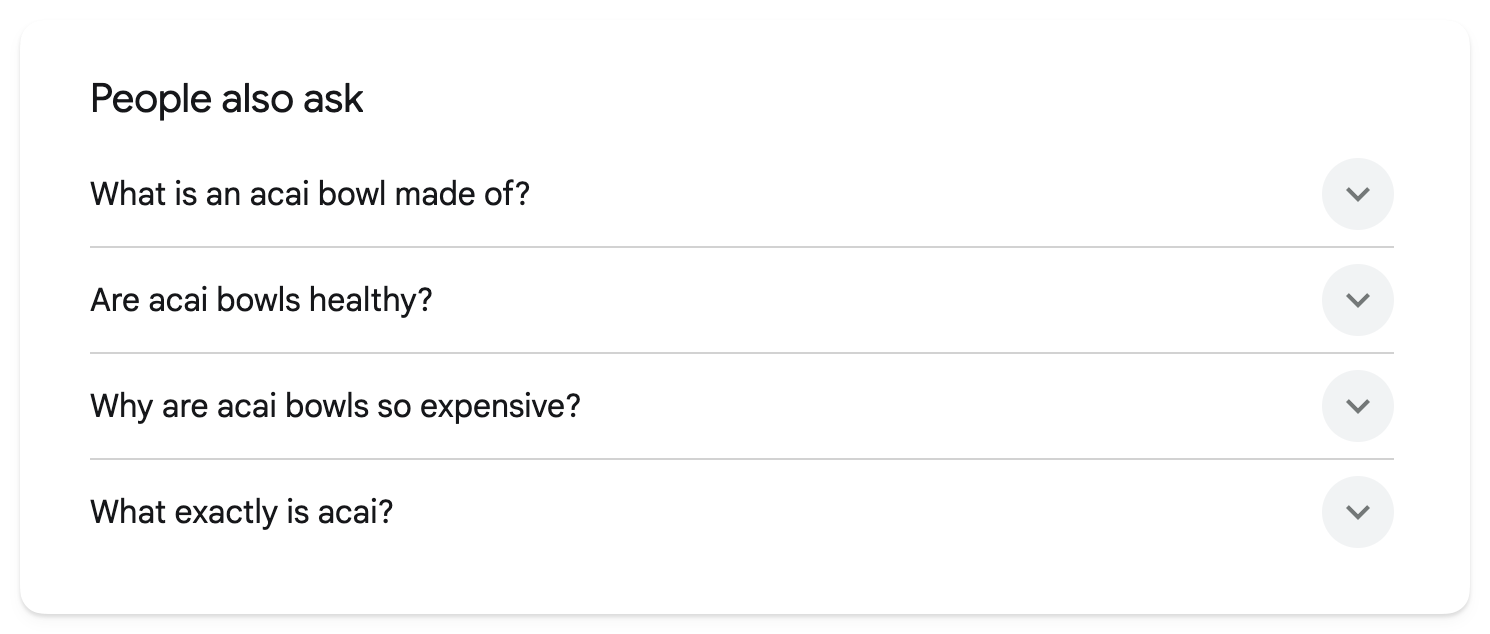
These questions are filled in by Google based on the searches others are making.
So when Google fills in your search and suggests others, these can be more keywords. And you can trust that people are really searching these keywords because Google wouldn’t show them to you otherwise.
Google Keyword Planner
You can use Google’s built-in advertising tool to generate keyword ideas. This is a little bit more complicated because you have to set up a Google Ads account for your restaurant. Here’s a comprehensive video on how to set up an account if you don’t have one.
In your account, you can access advertising tools, including the Keyword Planner.
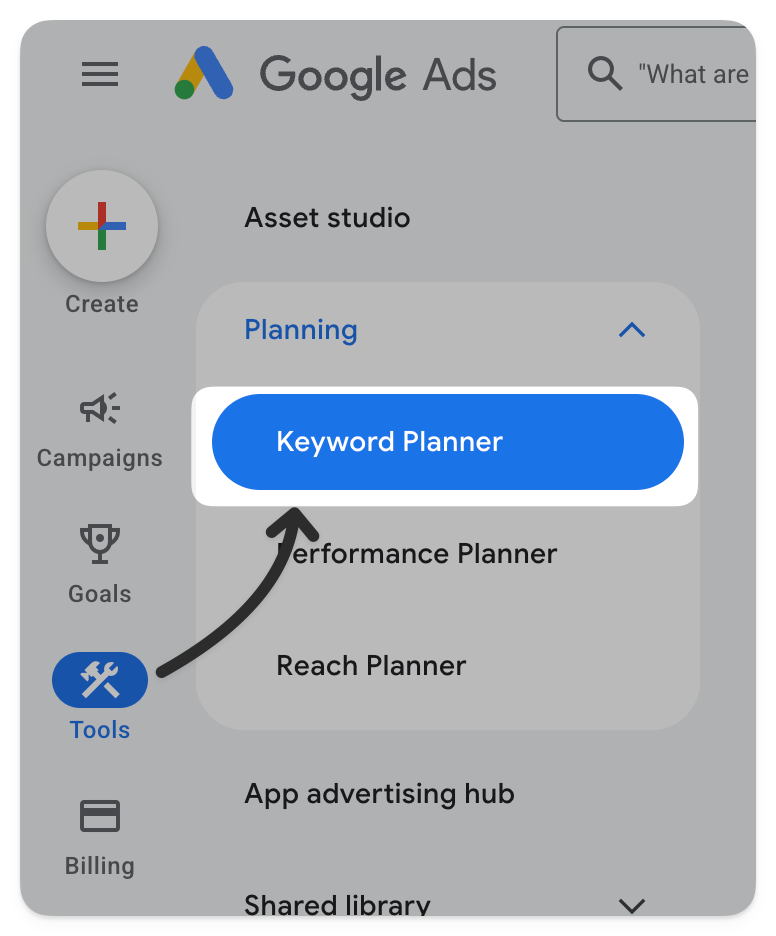
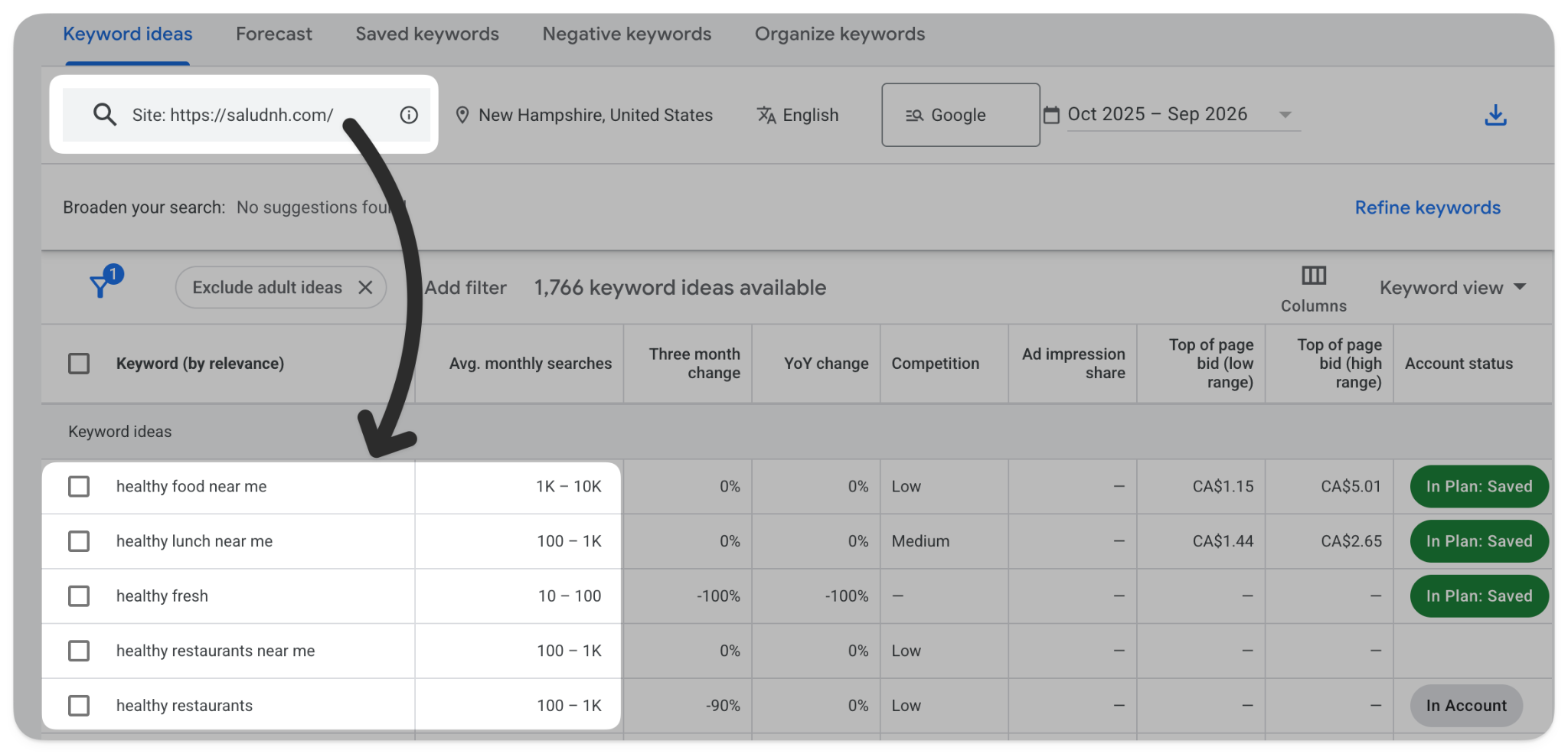
You can then enter some of your seed keywords to get ideas, or you can enter your restaurant’s website to see what Google suggests.
For Salud, adding their website to get suggestions brought up several interesting searches to add to our list. It also included the average monthly searches. I can sort the list from high to low to see where the most search traffic is.
Google Trends
Another free tool that doesn’t require you to set up an account to use it is the Google Trends website. This website lets you explore the search popularity of terms and topics over time.
Google Trends is built on Google Search data, so think of it as a more accessible way to see where search interest is for different keywords without having to set up a Google Ads account.
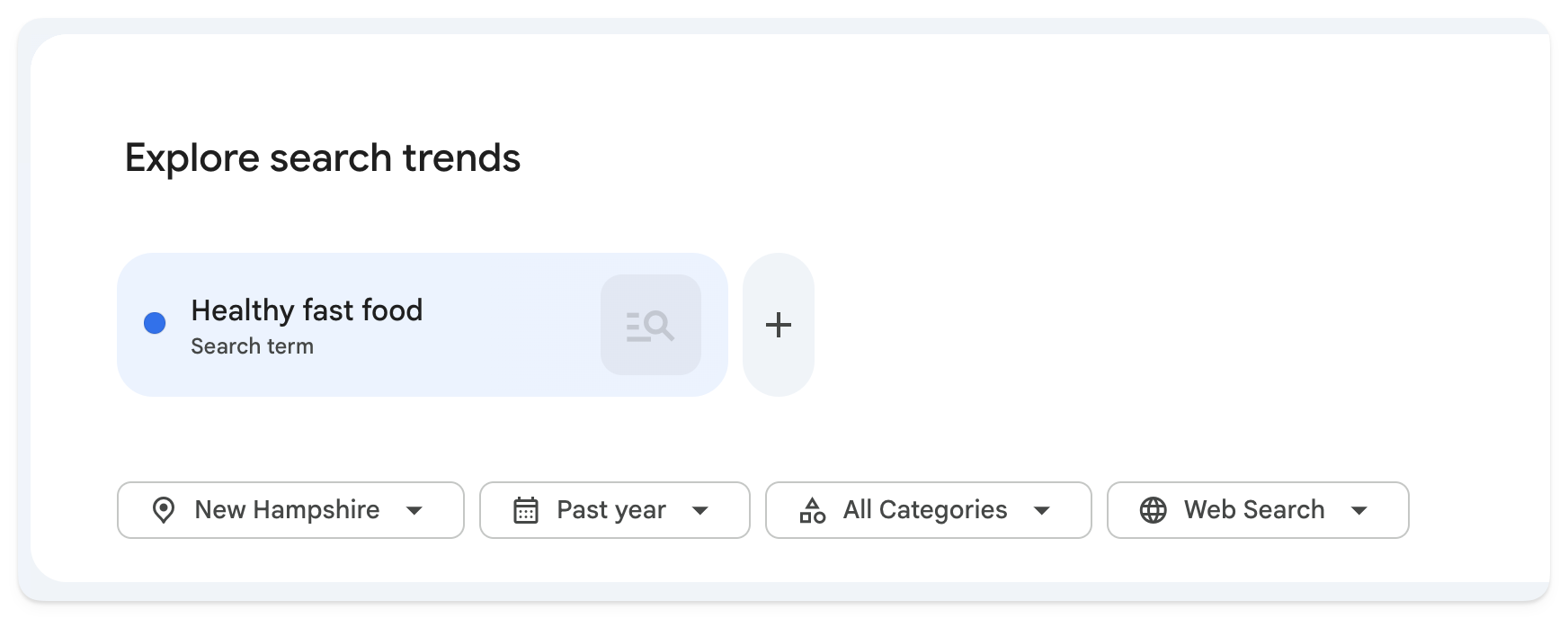
You can add different search terms and see how interest has been growing.
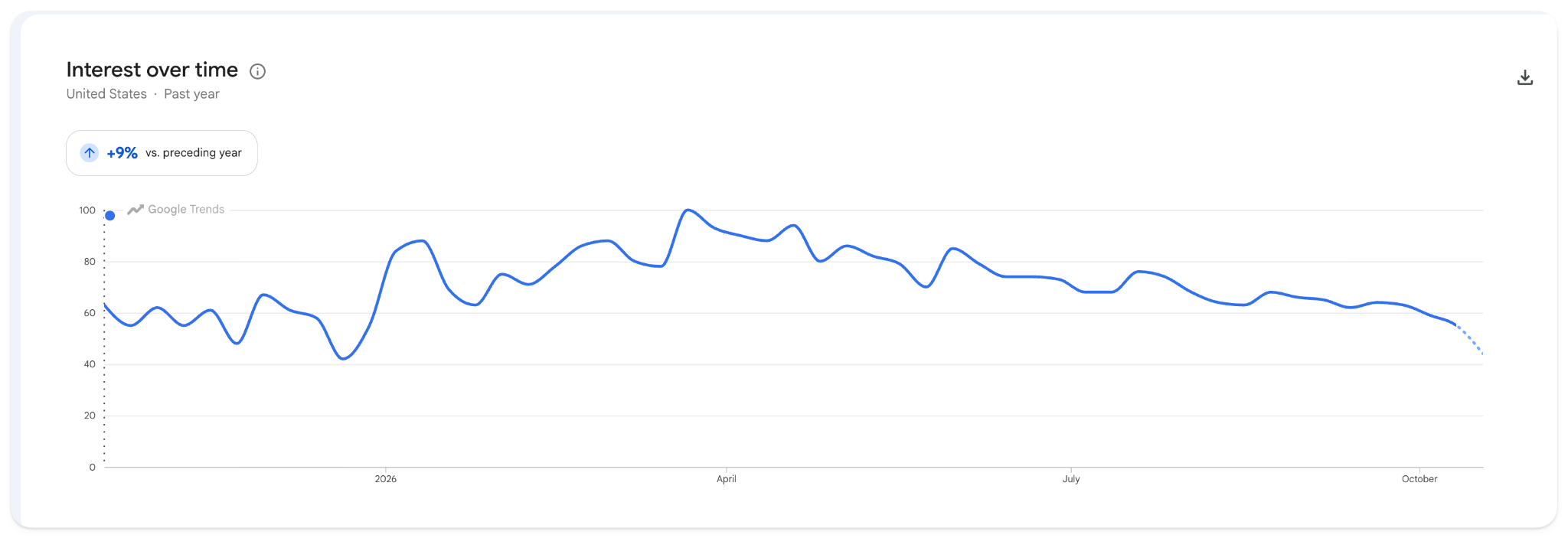
Add in one of your seed keywords, and you’ll see more suggested keywords. Google will even highlight those that are rising in popularity.
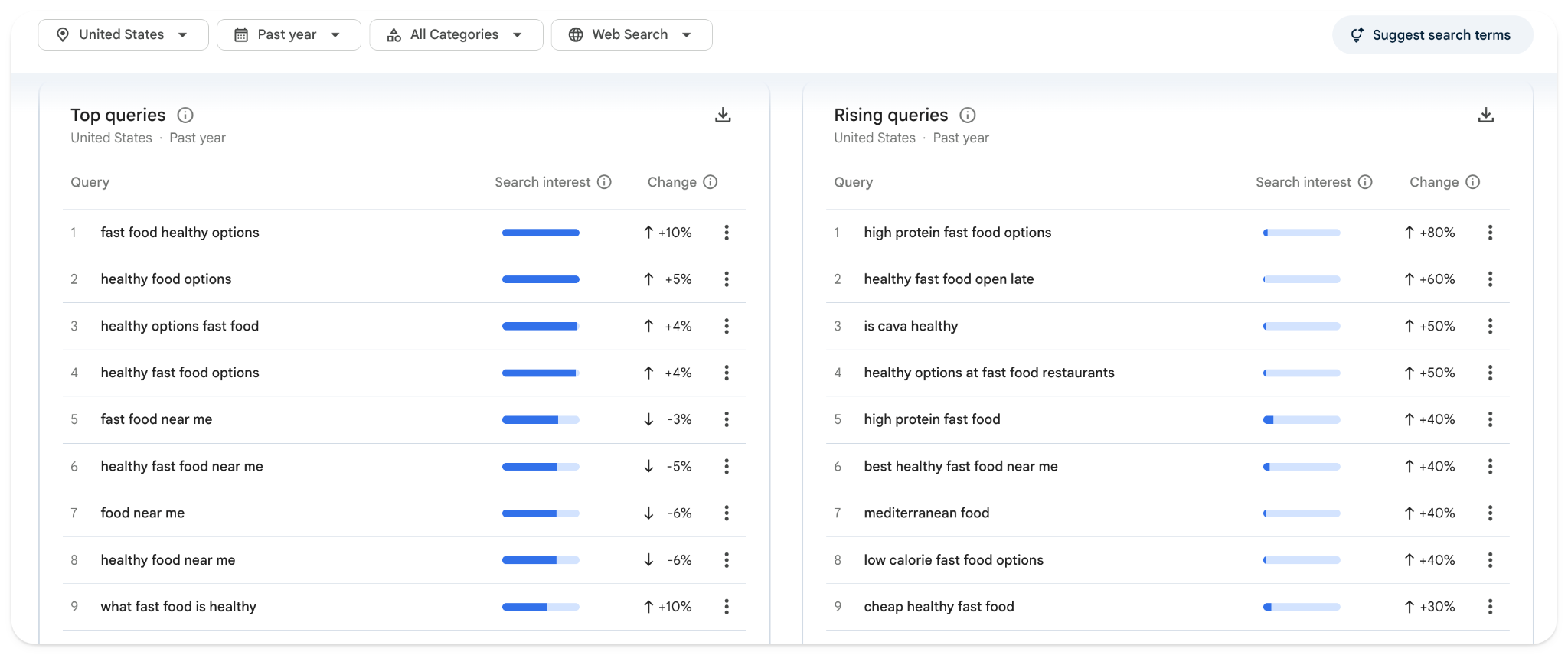
The only downside to Google Trends is it doesn’t give you the exact volume but a range from zero to one hundred in terms of interest. So it’s less scientific, but it gives you directional insights, and you’ll still find it helpful to generate more ideas.
Google Search Console
Google Search Console is another tool that you can use for free. It’s an organic search tool that you can add to your restaurant’s website. Specifically, it shows you how much traffic you get from Google’s organic search results. You can see how many impressions and clicks.
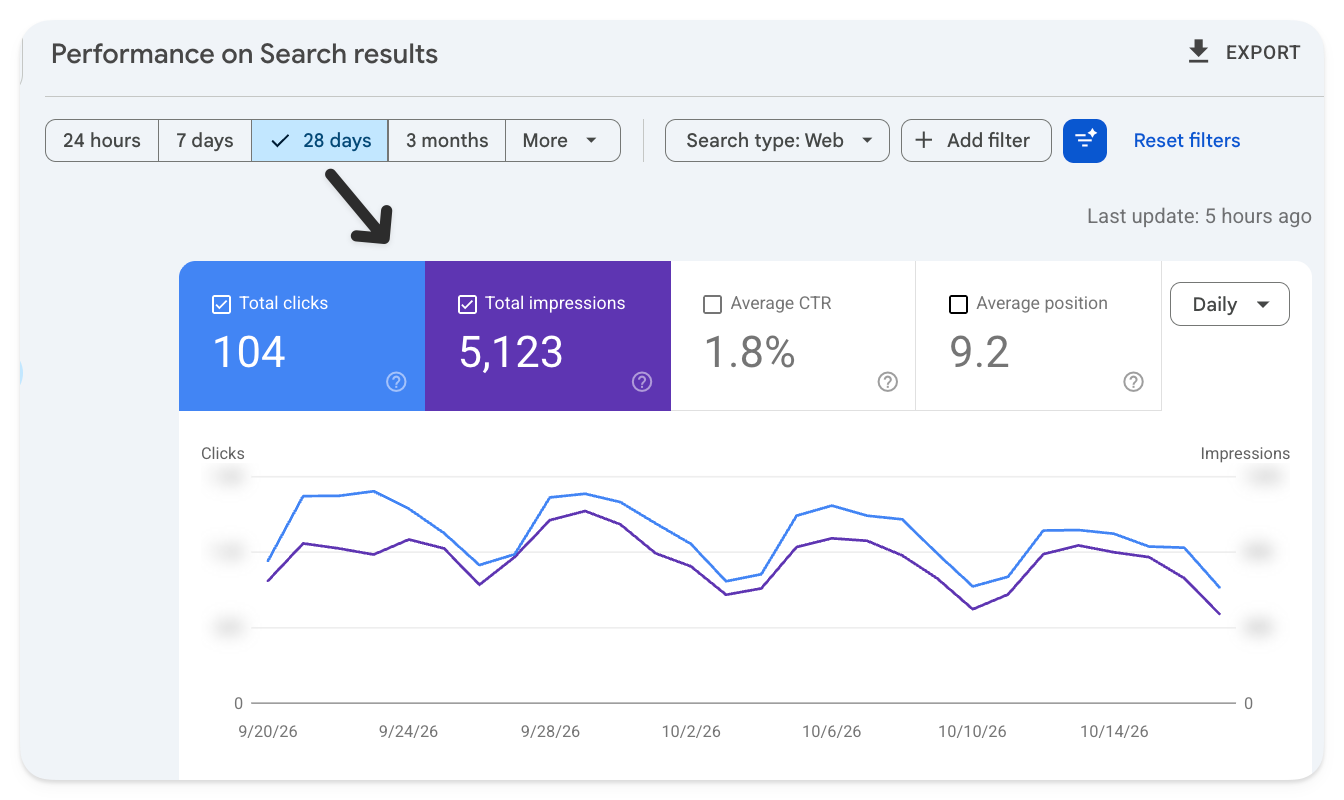
When you add the Google Search Console tracker to your website, you’ll start to see data on how many clicks and impressions different search terms brought to your website over time.
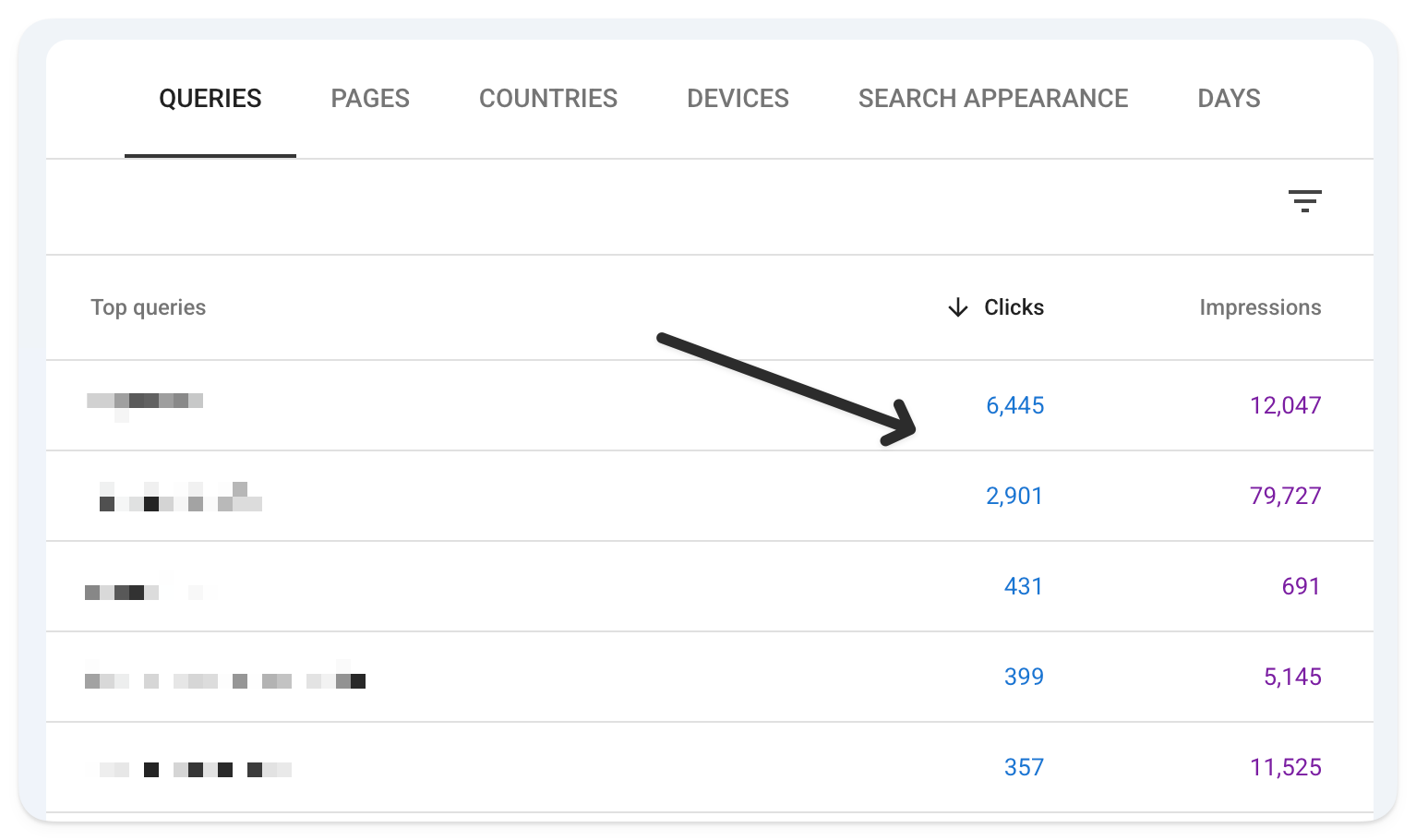
This is helpful because it’s real data based on your website’s performance in search results.
Step 3. Get the Numbers
At this point, you’ve done a ton of research building a large list of keywords. You’ve started to get data on how many searches happen per month for some of these keywords using free tools. But not all of them.
In this step, we’re going to build out a table that lists all of the keywords and their estimated search volume so that you can prioritize which ones are most important.
Your table is going to look something like this:
To get reliable data on our keywords without having to pay for a fancy tool, I’m going to give you links to various tools that offer a free option. The free options are limited, and they usually hit you with a paywall to upgrade to continue using it. But for our purposes, we can work with these limitations to get what we need.
Here are the tools I recommend:
- Semrush free keyword research tool
- SpyFu’s keyword audit tool
- Ahrefs’ keyword research tool
- Ubersuggest’s keyword lists
All of these tools are expensive. But they let you try them for free, at least for your first few searches. For a single-location restaurant, these free trials and Google’s own tools are usually enough. A paid plan only makes sense if you’re tracking dozens of keywords across several locations or publishing new content every week.
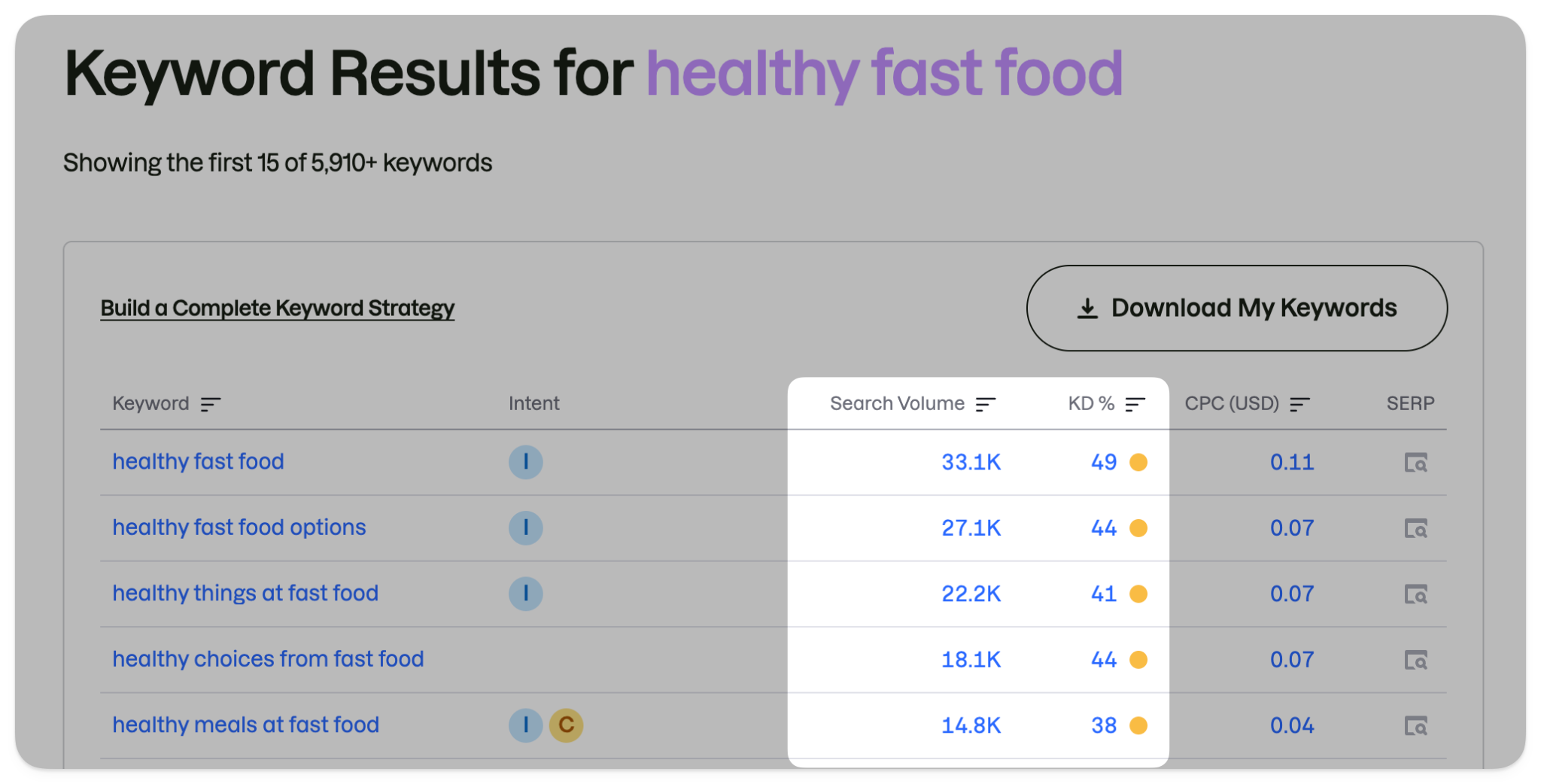
I want you to type in each of the keywords you’ve added to your list and get the estimated search volume and difficulty. Difficulty is measured on a scale of 1 to 100; the higher the number, the more competition in the organic search results.
Each tool will report slightly different numbers for the same keywords, but we don’t need it to be an exact science. We just need to know if something gets a lot or a little search volume.
Once you have a table with twenty to thirty keywords, you can start to analyze the data and prioritize.
How to Decide Which SEO Keywords to Target First
With your table of keywords in hand, here’s how you can decide which ones are most important for your restaurant right now.
Start by sorting your table by volume to see the most popular keywords at the top. This is the most obvious place to start. But just because a keyword has really high volume doesn’t mean you should immediately chase after it by creating a ton of content on your website around it.
Consider what the intent is behind that search. Ask yourself: Is this keyword really relevant to my restaurant? Or is it just interesting because it has a lot of searches?
You may decide there are some keywords you can delete from your table.
Next, see how winnable a keyword is based on its difficulty. By winnable, I mean it’s not an incredibly competitive keyword.
- If a keyword’s difficulty is between 1 and 10, there isn’t a lot of competition in the search results, so you have the opportunity to rank your restaurant’s website.
- But if something is above 50 on the scale, there are a lot of other websites that want to rank number one for that keyword. So it will take you a lot of time and effort.
Prioritize the middle-of-the-pack keywords in your table. These keywords have some search volume, but they also aren’t very competitive.
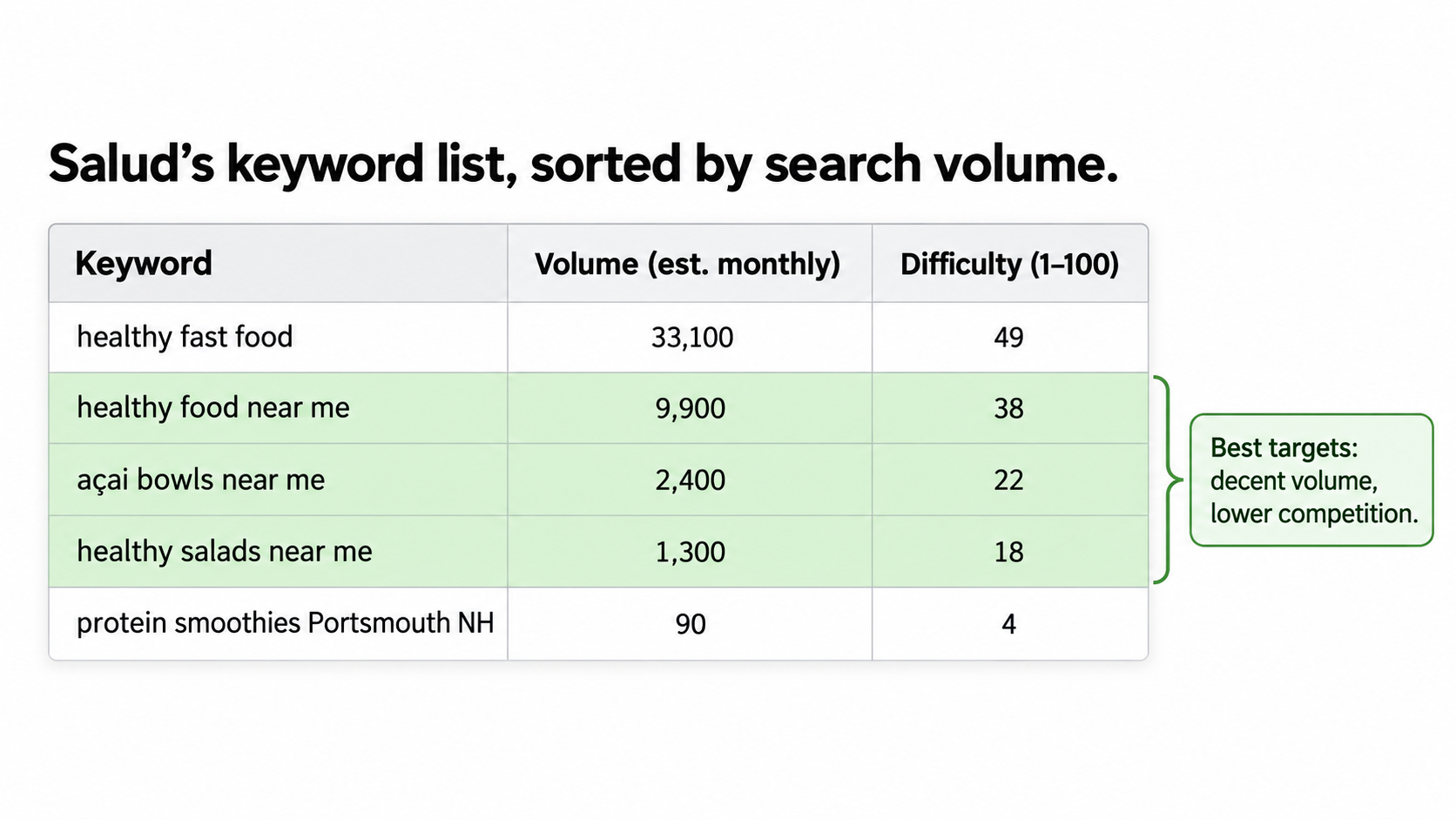
Now add a fifth column to your table. In this column, add one line to justify why you want to pursue that keyword. Is it directly related to something on your menu? Is it hyper-specific to your location? If you ranked number 1 in Google for that term, would everyone who came to your website order something?
Here’s what the table could look like for Salud:
How to Map Keywords to Pages on Your Website
At this stage, you have a decent number of keywords you know are important for your restaurant. So what’s next? How do we get our restaurant to show up at the top of the search results?
Let’s plan out how we’ll get your website to rank for these keywords in Google Search.
To start, we need to map our current website to these keywords. Think about the structure of a restaurant’s website. Every restaurant website has:
- A home page that tells your story and shares featured items
- A menu portal that people can order online from
- Location pages if you have multiple locations
- An ‘Our story’ page with your history
- A contact page with a form and location details
- Catering details
- Gift cards for purchase
- A blog to publish news and articles
- A careers page for hiring
Now, think about the main keywords that would apply to each of these pages. Let’s put it on a table to make it clear, using Salud as the example:
Now that you have the main keywords that each page is supposed to rank for, here’s how you actually get it to show up in search.
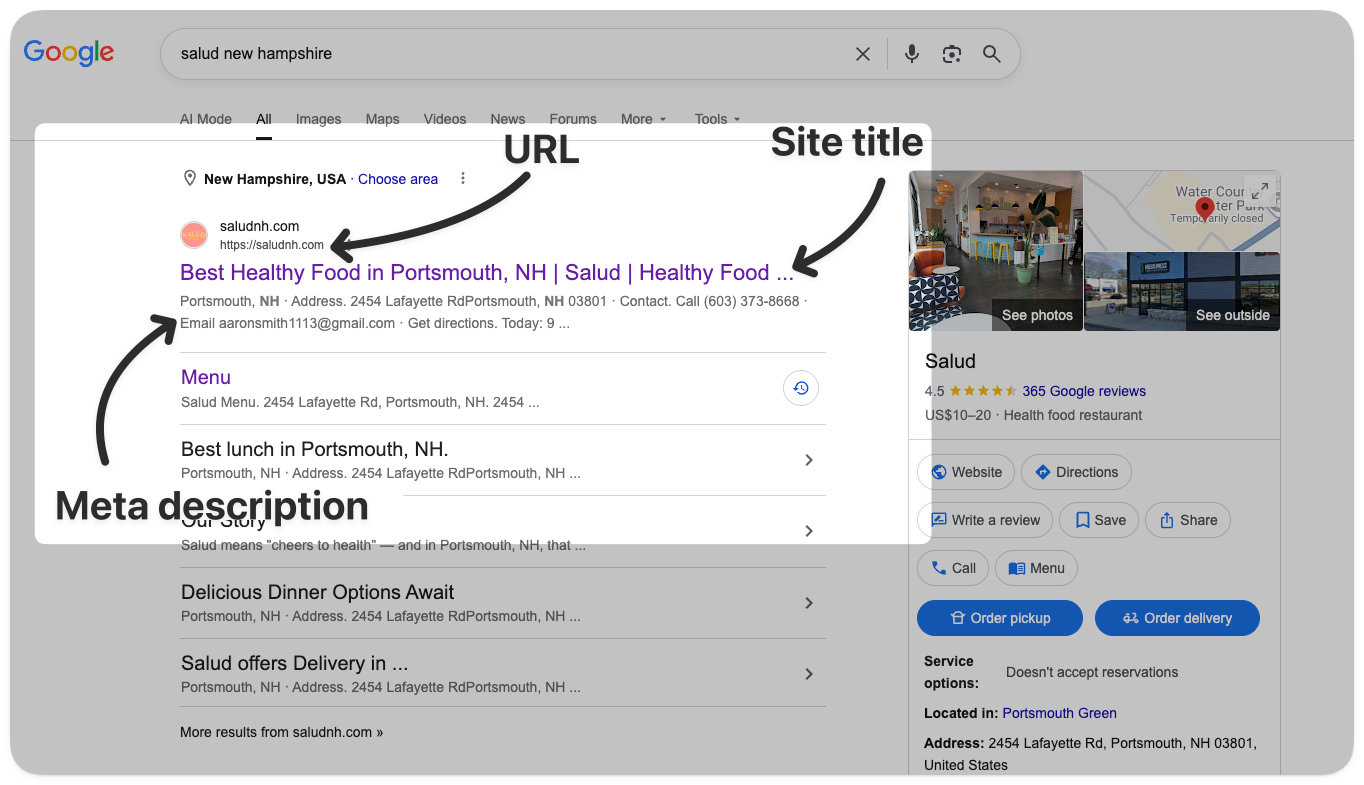
- Put the primary keyword in your page title. It isn’t shown on the page itself, but it’s the blue headline people see in Google’s search results.
- Like the page title, each page also has a meta description. Make sure to include your keyword in that description, since Google often shows it as the snippet under your page title in search results.
- Put the keyword in the main heading on your page. This is called the H1.
- Within the page, sprinkle your primary and secondary keywords throughout the paragraphs where it makes sense.
- If there are images on your page, add ALT text to them (explanations of what the image is), including your keyword where appropriate.
Okay, now that we’ve mapped the keywords to our main pages and we’ve discussed how to optimize each page for your respective keyword, we have to talk about AI search.
Where AI Search Comes Into Play
More and more customers are turning to AI tools like ChatGPT to search for restaurants. A 2026 report by Reputation, an intelligence tool, found that 1 in 5 people now use AI for restaurant information and recommendations.
That puts AI on par with TripAdvisor and Yelp!
However, don’t feel that you have to change everything now that people use AI. Anything you’ve followed thus far to optimize your website for search engines will also help you in AI search - phew!
But understand that how people search with AI is different from traditional search. For example, people use 3 times as many words to search on Google’s new AI Mode as they do in traditional Google Search.
Why?
People include a lot more context about what they’re looking for.
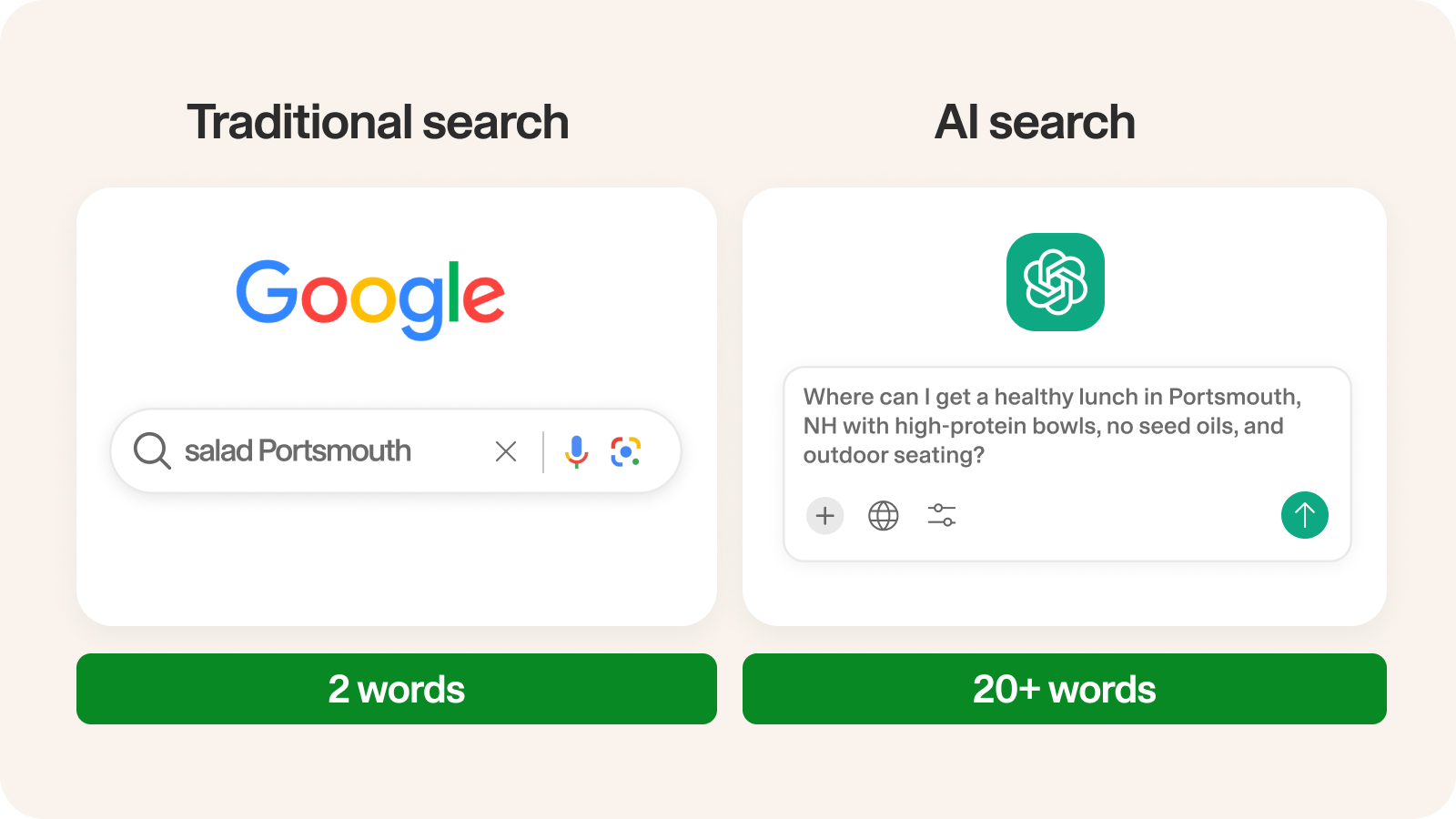
Therefore, here’s what you need to know as it pertains to your SEO keywords.
To get your restaurant recommended, AI search tools first need to cite you as a source. That means making your website readable. So if your SEO basics are covered, like having a structured website and keywords in your page titles and headings, you’ve done most of the work.
How to Track Whether Your SEO Keywords Are Working
Let’s cover how you will know if the SEO keyword work you’re doing for your restaurant is paying off.
First, you need two tools:
- Your Google Search Console, which measures how your website gets traffic, specifically from Google (here is a helpful introduction to GSC if you’ve never used it before).
- Your Google Business Profile, which is your most important listing outside of your website.
Take the keywords you mapped to each page. After you make the changes to your restaurant’s website to optimize for those keywords, give it two weeks to be recrawled by Google (if you want Google to crawl it faster, I’ll share this guide on how to request that Google crawl a webpage).
After two weeks, here’s how to use Google Search Console to see if it’s working. After you optimize your website, you should start to see these pages grow. Specifically, you’ll see the following increase:
- Impressions (people seeing your webpage in Google Search)
- Clicks (people clicking on your webpage from Google Search)
- Position (where you are in the list of results)
You can also start to see the real keywords that bring impressions and clicks to your website. You should start to see keywords that resemble what you optimized for. You’ll likely be surprised as new keywords pop up that you didn’t think of.
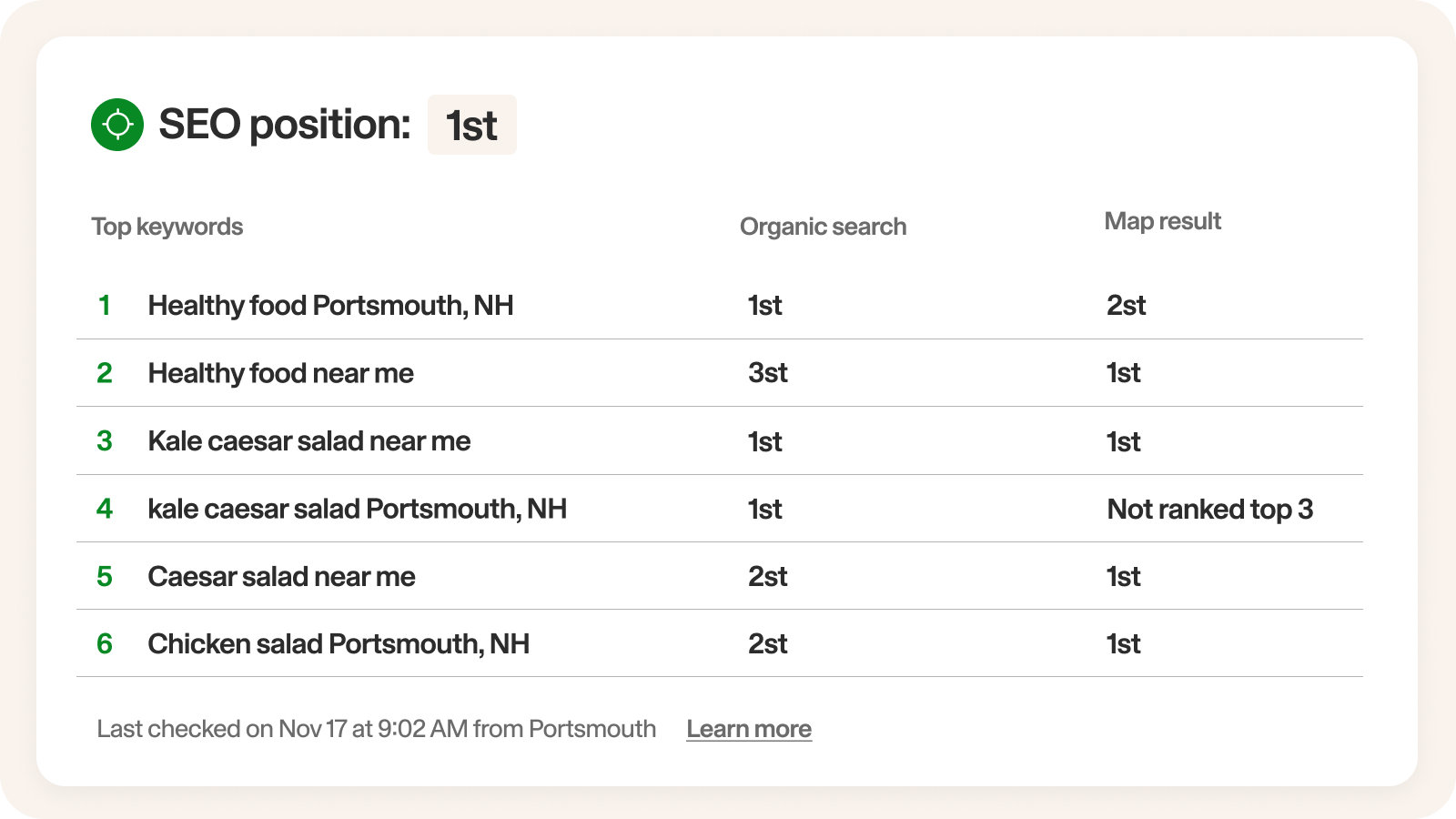
In addition to Google Search Console, your Google Business Profile will reveal if your work is paying off. As your presence in Google Search grows, you should start to see new customers interacting with your Google Business Profile. They’ll click for directions and call you.
You’re able to measure how many calls and direction requests you get from your Google Business Profile. It should grow in proportion to your impressions and clicks.
Lastly, your online orders will be the final result of your SEO work paying off. If you’re bringing in more customers from search engines and they’re ordering, you’re doing the right things!
How Owner Does the SEO Keyword Work for You
It takes time to go from choosing keywords and figuring out how to update your website to optimize for them to seeing results. But I hope you aren’t questioning whether or not it is important at all. It is!
However, you don’t have to do all of this yourself. Hiring an agency or freelancer for restaurant SEO services can be expensive, and most owners don’t have the time or skills to do it themselves. If your restaurant website is built on Owner, they automatically take care of the foundational SEO best practices that you need to attract customers to your website.
They have an entire platform designed to help your restaurant get found on Google, grow direct orders, and market to guests you already have. That includes building your site around the local keywords that you brainstormed while following this guide. Owner’s AI looks for relevant, high-volume, high-intent food searches and automatically creates pages around those opportunities. For restaurants on Owner, these auto-created pages drive up to about 40% of their Google traffic.
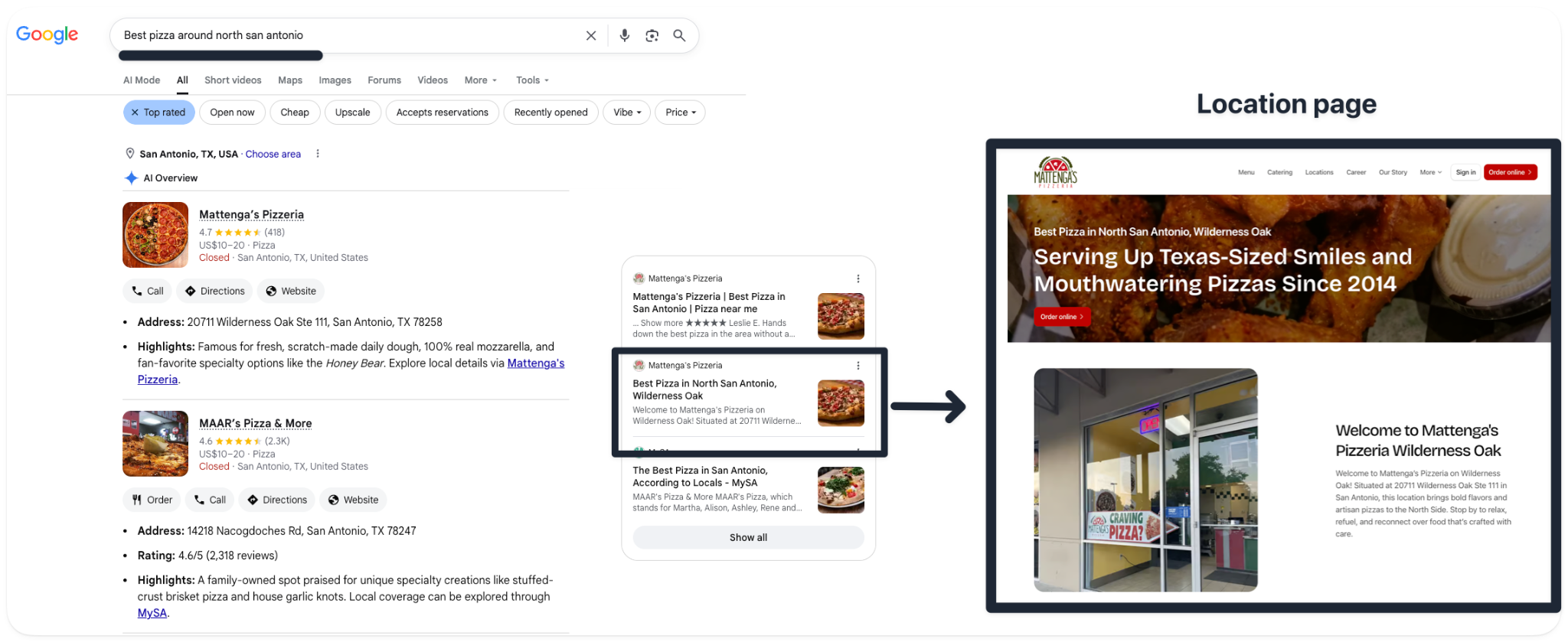
It also synchronizes your NAP details and menu across all your local listings, so Google and other search engines don’t find conflicting information about your restaurant. All this helps nearby customers find you when they search for what you serve.
On top of that, 46% of Owner locations rank number one in the Google Maps pack, and about 68% rank in the top three. Most customers start seeing Google ranking improvements within 30 to 60 days.
If you want to really start to turn your website into an engine for your restaurant’s growth, you can schedule a free demo with the Owner team to learn more.
Frequently Asked Questions About Restaurant SEO Keywords
How do I find the right SEO keywords for my restaurant?
Start with seed keywords from six categories: cuisine and dish, location, intent and action, occasion, dietary, and branded. Then expand the list with free tools like Google autocomplete, People Also Ask, Google Keyword Planner, Google Trends, and Search Console, and check each keyword’s search volume and difficulty before you prioritize.
How many keywords should a restaurant target?
Build a list of twenty to thirty keywords, then give each main page on your website one primary keyword and a few secondary ones. A single-location restaurant doesn’t need hundreds of keywords to get started.
Do I need a paid SEO keyword tool?
Usually not in the beginning. Google’s free tools and the free trials of tools like Semrush, Ahrefs, and Ubersuggest give most restaurants enough data to build momentum in their SEO strategy. A paid plan only makes sense if you manage several locations or publish content regularly. These tools also have a learning curve, so only pay for them if you feel you’ve exhausted what you can do with free tools.
Do keywords help my restaurant rank in Google Maps?
Yes, indirectly. Google Maps rankings depend mostly on your Google Business Profile, your reviews, and how close the searcher is. But keywords on your website and profile help Google understand what you serve, which supports your visibility for searches like “[cuisine] near me.”
Should my menu items be keywords?
Yes, especially your signature dishes. Customers often search for a specific dish, like “açai bowls near me,” so your online menu should list dishes as real text with clear names and descriptions, not as a PDF or image.
How often should I update my keyword list?
Review it every three to six months, or whenever you change your menu, open a new location, or add a service like catering. Search Console will also show you new keywords people use to find you, which will give you ideas on what to add or refine in your existing keyword list.
Is restaurant SEO worth it?
It depends on your numbers. Divide the monthly fee by your average order value times your margin to see how many extra orders you need each month to break even. If the service can realistically drive more orders than that, it’s worth it.
Can I do restaurant SEO myself?
Yes. Most single-location owners can cover the fundamentals themselves: a working website with consistent name, address, and phone details, an accurate Google Business Profile, online ordering, and a steady flow of reviews. Expect to spend one to five hours a week.